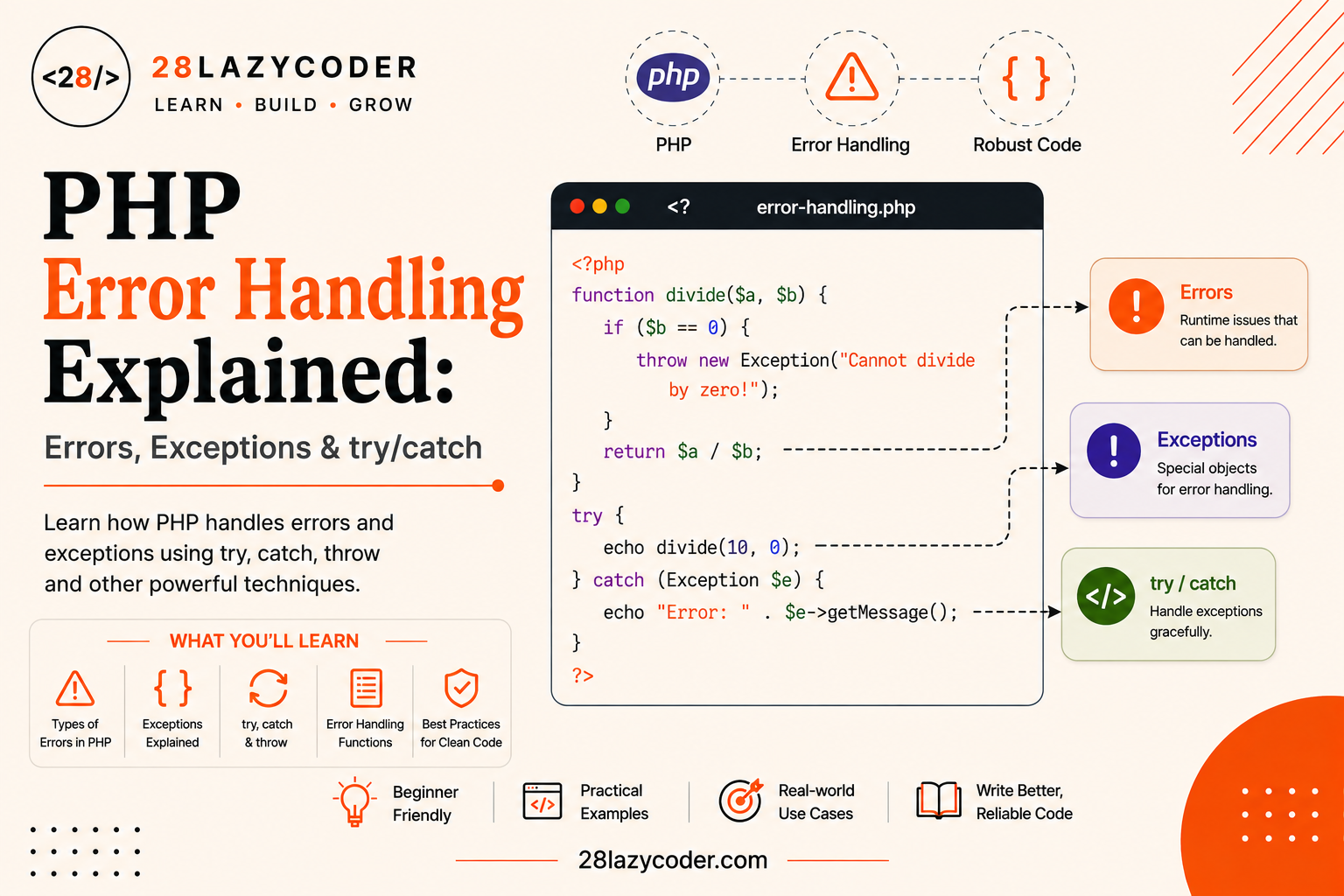
Have you ever run a PHP script, expected a nice clean page, and instead gotten a wall of text like Fatal error: Uncaught Error: Call to undefined function with your entire page just… stopping?
That’s PHP telling you something went wrong, in the only way it knew how, at that moment. The good news is that PHP gives you tools to handle these situations gracefully, instead of letting your whole website break in front of your visitors.
That’s exactly what error handling is: preparing for the things that can go wrong a missing file, bad user input, a failed database connection so your script can respond calmly instead of collapsing.
In this guide, we’ll go from the very basics (what actually counts as an “error” in PHP) all the way through try, catch, finally, and writing your own custom exceptions using plain language and real examples the whole way.
If you’re still getting comfortable with the basics, our guides on PHP functions and PHP conditional statements are great places to start first, since error handling builds directly on both.
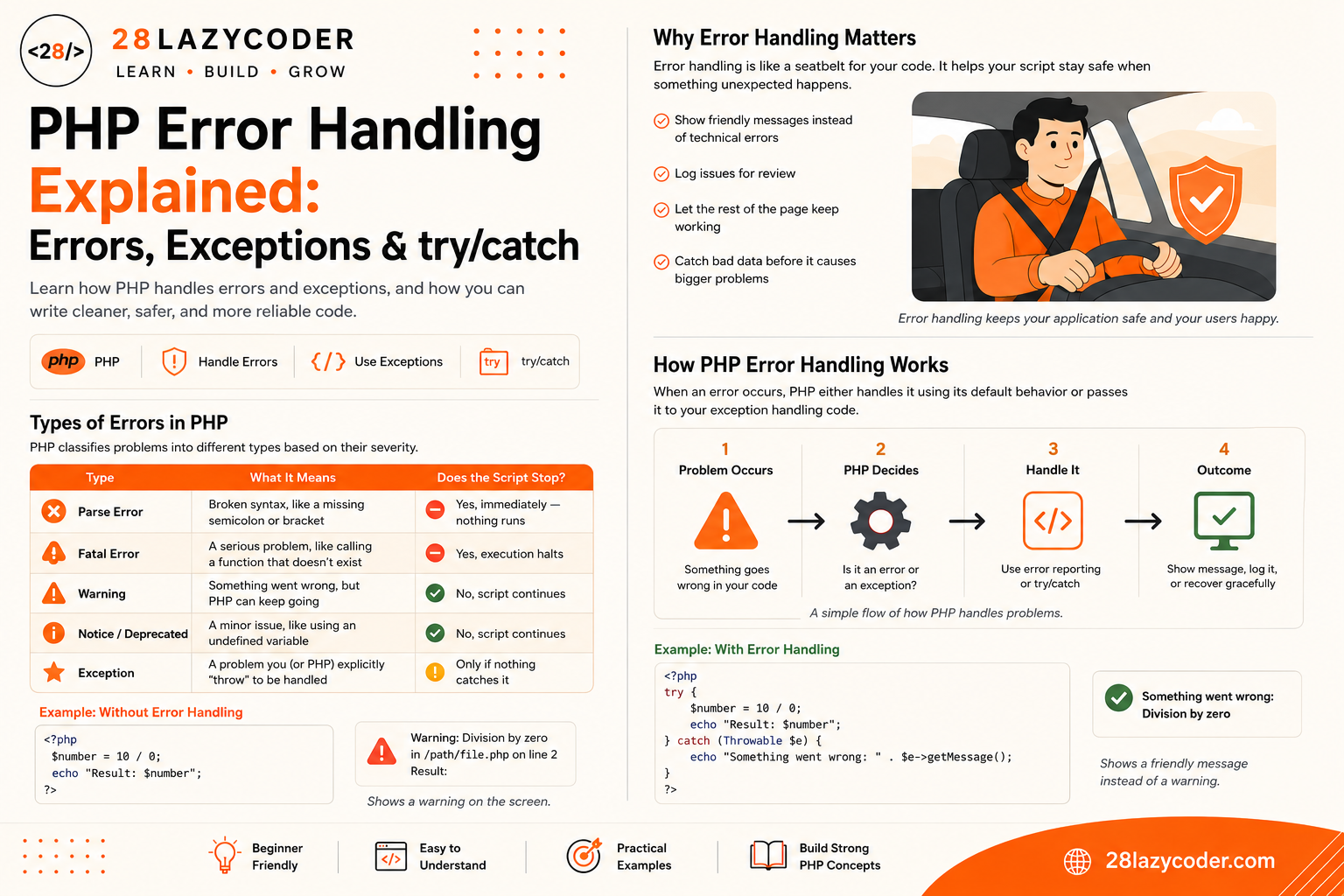
Why Error Handling Matters
Simple analogy: Think of error handling like a car’s seatbelt. You don’t wear it because you’re planning to crash you wear it because if something unexpected happens, you want a safety system already in place, instead of figuring it out in the middle of the accident.
Without error handling, a single unexpected problem a missing file, an invalid number, a failed database connection can crash your entire script and show visitors a broken, unprofessional page (or worse, expose sensitive details about your server).
With proper error handling, you can:
- Show a friendly message instead of a scary technical error
- Log the problem somewhere for you to review later
- Let the rest of the page keep working even if one part fails
- Catch bad data before it causes bigger problems down the line
Types of Errors in PHP
Not all problems in PHP are treated the same way. PHP separates them into a few categories, based on how serious they are.
| Type | What It Means | Does the Script Stop? |
|---|---|---|
| Parse Error | Broken syntax, like a missing semicolon or bracket | Yes, immediately nothing runs |
| Fatal Error | A serious problem, like calling a function that doesn’t exist | Yes, execution halts |
| Warning | Something went wrong, but PHP can keep going | No, script continues |
| Notice / Deprecated | A minor issue, like using an undefined variable | No, script continues |
| Exception | A problem you (or PHP) explicitly “throw” to be handled | Only if nothing catches it |
Parse Errors
A parse error happens when your code isn’t valid PHP at all think of it like a sentence with grammar so broken that no one, not even PHP, can understand what you meant.
php
<?php
echo "Hello world"
// Missing semicolon above — this is a parse error
Fatal Errors
A fatal error happens when PHP understands your code, but hits something it simply cannot recover from, like calling a function that was never defined.
php
<?php
sayHello(); // Fatal error: Call to undefined function sayHello()
Warnings and Notices
Warnings and notices are PHP’s way of saying “something looks off, but I can still continue.” For example, using a variable that was never set:
php
<?php
echo $undefinedVariable; // Warning: Undefined variable $undefinedVariable
The script keeps running after this but ignoring these regularly is a common source of bugs that quietly break your data later.
Traditional PHP Error Handling
Before diving into exceptions, it’s worth knowing PHP’s original, simpler tools for dealing with errors.
error_reporting()
error_reporting() controls which types of errors PHP actually shows you. During development, it’s common to show everything:
php
<?php
error_reporting(E_ALL);
ini_set('display_errors', 1);
On a live website, you’d usually turn display_errors off (so visitors never see raw error messages) and log errors to a file instead.
set_error_handler()
set_error_handler() lets you write your own function to run whenever PHP generates a warning or notice, instead of using PHP’s default behavior.
php
<?php
function my28lazytheme_error_handler($errno, $errstr) {
    echo "Something went wrong: $errstr";
}

set_error_handler('my28lazytheme_error_handler');

echo $undefinedVariable;
This traditional approach still exists and is useful, but modern PHP code generally leans on exceptions instead, because they’re more structured and easier to control precisely which brings us to the main event.
What Is an Exception?
An exception is a special kind of object PHP creates to represent an error condition, which you can catch and respond to using dedicated code blocks instead of letting your whole script crash.
Simple analogy: Imagine you’re cooking, and a recipe step says “if the oven isn’t preheated, stop and check it before continuing.” Throwing an exception is exactly that “stop and check” moment except in PHP, you also get to decide exactly what happens next, instead of the whole kitchen shutting down.
The key phrase in PHP’s exception system is “throw and catch.” You throw an exception when something goes wrong, and you catch it somewhere else in your code to decide how to respond.
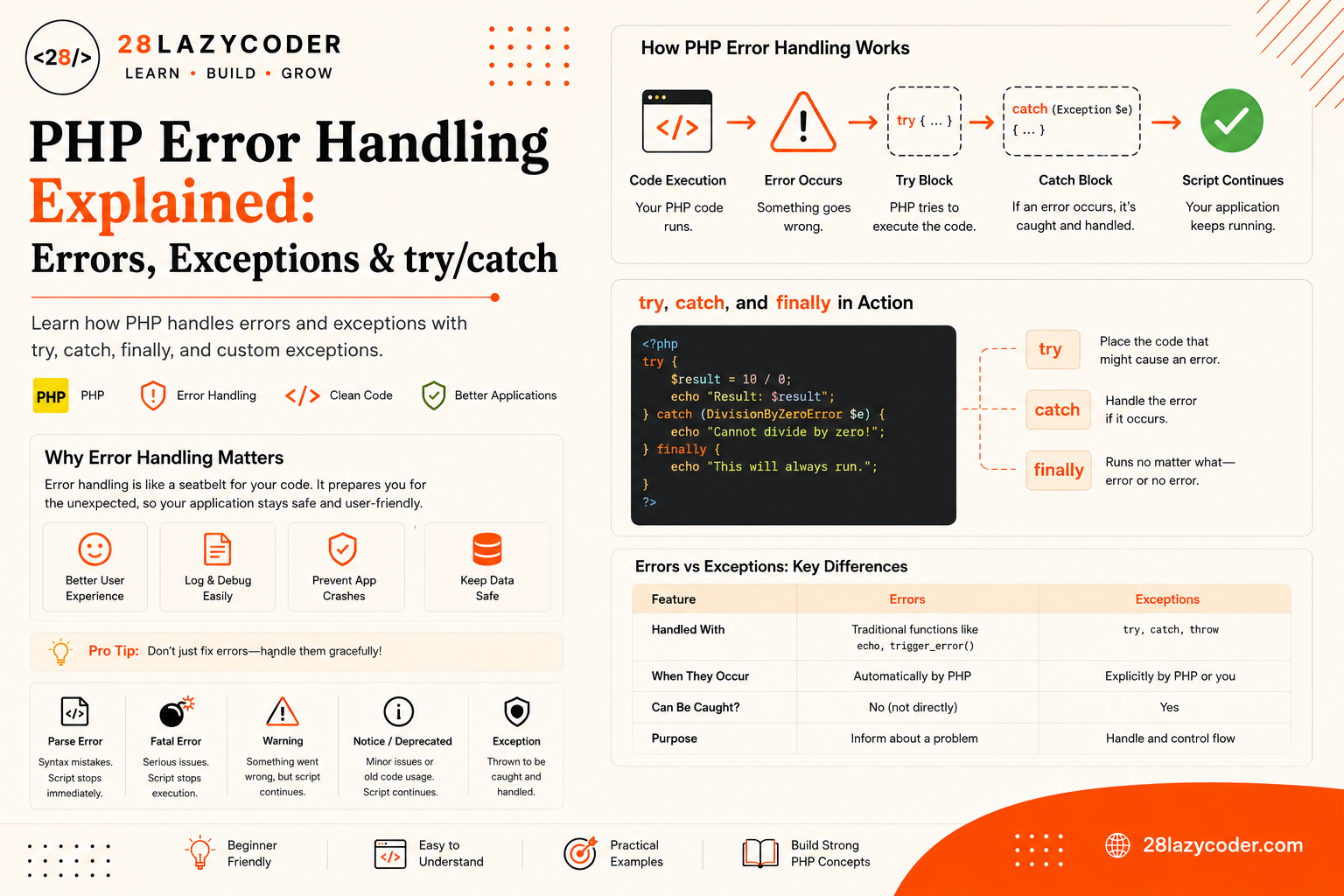
try, catch, and finally Explained
This is the heart of PHP error handling three keywords that work together:
trywraps the code you want to attempt, which might fail.catchruns only if an exception was thrown inside thetryblock, letting you handle it gracefully.finallyruns no matter what happened, whether the code succeeded or failed. Useful for cleanup tasks.
php
<?php
function my28lazytheme_divide($a, $b) {
    if ($b === 0) {
        throw new Exception("Cannot divide by zero.");
    }
    return $a / $b;
}

try {
    echo my28lazytheme_divide(10, 0);
} catch (Exception $e) {
    echo "Error caught: " . $e->getMessage();
} finally {
    echo "\nDivision attempt finished.";
}
Output:
Error caught: Cannot divide by zero.
Division attempt finished.
Notice that the script didn’t crash. Instead, execution jumped straight from the throw statement into the matching catch block, and the finally block ran afterward regardless of what happened.
Simple analogy: try is you attempting a task. catch is your backup plan if it goes wrong. finally is the thing you do either way like turning off the stove, whether dinner came out perfectly or burned.
Catching Multiple Exception Types
Real projects often throw different kinds of exceptions for different problems. You can catch them separately, handling each one differently:
php
<?php
try {
    $value = -5;

    if ($value < 0) {
        throw new InvalidArgumentException("Value cannot be negative.");
    }

    if ($value === 0) {
        throw new DivisionByZeroError("Cannot use zero here.");
    }

} catch (InvalidArgumentException $e) {
    echo "Invalid input: " . $e->getMessage();
} catch (DivisionByZeroError $e) {
    echo "Math error: " . $e->getMessage();
} catch (Exception $e) {
    echo "Something else went wrong: " . $e->getMessage();
}
PHP checks each catch block in order, from top to bottom, and runs the first one that matches the type of exception that was thrown. A general catch (Exception $e) at the end acts as a safety net for anything more specific you didn’t account for.
Throwing Your Own Exceptions
You don’t have to wait for PHP to throw an exception for you you can (and often should) throw your own, whenever your code detects a situation it can’t safely continue with.
php
<?php
function my28lazytheme_get_user_age($age) {
    if (!is_numeric($age) || $age < 0) {
        throw new Exception("Age must be a valid positive number.");
    }
    return (int) $age;
}

try {
    echo my28lazytheme_get_user_age("banana");
} catch (Exception $e) {
    echo "Invalid input: " . $e->getMessage();
}
This is one of the most useful patterns in PHP error handling: validate your data early, and throw a clear, specific exception the moment something doesn’t look right rather than letting bad data quietly cause problems somewhere else, later on.
Creating Custom Exception Classes
For larger projects, it’s common to create your own exception classes by extending PHP’s built-in Exception class. This lets you catch very specific problems, separately from generic ones.
php
<?php
class My28lazythemeInvalidEmailException extends Exception {}

function my28lazytheme_validate_email($email) {
    if (!filter_var($email, FILTER_VALIDATE_EMAIL)) {
        throw new My28lazythemeInvalidEmailException("'$email' is not a valid email address.");
    }
    return true;
}

try {
    my28lazytheme_validate_email("not-an-email");
} catch (My28lazythemeInvalidEmailException $e) {
    echo "Email problem: " . $e->getMessage();
}
Custom exception classes make your code self-documenting anyone reading catch (My28lazythemeInvalidEmailException $e) instantly knows exactly what kind of problem is being handled, without reading any extra comments.
Errors vs Exceptions: Quick Comparison
| Concept | Errors | Exceptions |
|---|---|---|
| Triggered by | PHP itself, automatically | You (or PHP), using throw |
| Can be caught with try/catch? | Some, since PHP 7 (via Error class) | Yes, always |
| Typical cause | Broken syntax, undefined functions/variables | Invalid data, failed operations, business logic problems |
| Best used for | Signaling something is fundamentally broken in the code | Signaling a specific, expected-but-unwanted situation |
| Recoverable by default? | Often not (especially fatal errors) | Yes, by design |
Best Practices for Error Handling
- Be specific with exception types. Catching a specific exception class is far more useful than catching everything with a single generic
Exception. - Never show raw error details to visitors on a live site. Log the details, and show a friendly message instead.
- Always clean up in
finallywhen you’re dealing with things like open files or database connections, so they get closed no matter what happens. - Throw early, catch late. Validate data and throw exceptions as close to the source of the problem as possible, but catch and handle them wherever it makes sense for the user experience.
- Don’t use exceptions for normal control flow. They’re for exceptional situations, not everyday logic like loops or simple conditionals.
- Always include a helpful message when throwing an exception future-you (or another developer) will need it while debugging.
Common Mistakes Beginners Make
- Wrapping everything in one giant try/catch block, which makes it hard to tell exactly which line actually failed.
- Catching
Exceptionbut doing nothing with it (an “empty catch block”), which silently hides real problems instead of solving them. - Confusing
ErrorandException. Since PHP 7, both extend a commonThrowableinterface, but they represent different kinds of problems and aren’t always interchangeable. - Displaying raw error messages to users on a live website, which can accidentally expose file paths or sensitive server details.
- Forgetting that
finallyalways runs, even if youreturnfrom inside thetryorcatchblock. - Throwing generic exceptions everywhere instead of creating specific, descriptive custom exception classes for different problems.
Interview Questions on PHP Error Handling
- What’s the difference between an error and an exception in PHP? Errors are typically triggered automatically by PHP itself (like calling an undefined function), while exceptions are explicitly thrown, either by your own code or by PHP, to represent a specific problem you can catch and handle.
- What does the
finallyblock do? It runs after thetryandcatchblocks, regardless of whether an exception was thrown or caught — commonly used for cleanup tasks like closing files or database connections. - Can you catch multiple exception types in one
catchblock? Yes, using the pipe symbol:catch (TypeOne | TypeTwo $e) { ... }, PHP will catch either type in that single block. - How do you create a custom exception in PHP? By creating a class that extends the built-in
Exceptionclass, which lets you catch that specific type separately from generic exceptions. - What happens if an exception is thrown but never caught? PHP triggers a fatal error, and script execution stops, showing an “Uncaught Exception” message.
- Why shouldn’t you use exceptions for regular program logic? Because exceptions are meant to represent genuinely exceptional, unexpected situations. Using them for routine control flow makes code harder to read and can hurt performance.
Scenario-Based Problems and Solutions
Scenario 1: A form on your site crashes with a fatal error whenever a user submits an empty field. Solution: Wrap the form processing logic in a try block, and throw a custom InvalidArgumentException when required fields are empty, then catch it to show a friendly validation message instead of a fatal error.
Scenario 2: Your script connects to a database, but if the connection fails, the whole page shows a blank white screen. Solution: This is a classic sign of a fatal error with error display turned off. Wrap the connection attempt in a try/catch block, log the real error using error_log(), and show the visitor a friendly “We’re experiencing technical issues” message instead.
Scenario 3: You have three different validation checks, but a single generic catch (Exception $e) makes it impossible to tell which one failed. Solution: Create separate custom exception classes for each validation type (like InvalidEmailException, InvalidAgeException), and add multiple catch blocks so each type of problem gets its own specific, clear handling.
Scenario 4: A file-processing script opens a file, but if something fails halfway through, the file never gets closed properly. Solution: Move the file-closing code into a finally block, so the file always gets closed — whether the processing succeeded or an exception was thrown partway through.
Frequently Asked Questions
What is error handling in PHP, in one sentence?
Error handling in PHP is the practice of anticipating problems in your code like invalid data or failed operations and responding to them gracefully using tools like try, catch, and finally, instead of letting the whole script crash.
What’s the difference between try/catch and error_reporting()?
error_reporting() controls which PHP-generated errors and warnings are displayed or logged, while try/catch is used to handle exceptions you or your code explicitly throw. They solve related but different problems, and many real projects use both.
Do I need to use exceptions for every function I write?
No. Exceptions are best reserved for genuinely unexpected or invalid situations, not everyday logic. Overusing them can make code harder to follow.
Can I catch PHP’s built-in fatal errors with try/catch?
Since PHP 7, many (but not all) fatal errors are represented as Error objects, which can be caught using catch (Error $e), since Error and Exception both implement the same Throwable interface. Parse errors, however, still cannot be caught, since they happen before your code even runs.
What does getMessage() do?
It’s a built-in method available on every exception object that returns the human-readable error message you (or PHP) provided when the exception was thrown.
Is it bad practice to have an empty catch block?
Generally, yes. An empty catch block silently swallows the error without doing anything about it, which makes debugging much harder later. At minimum, log the error even if you choose not to show it to the user.
Trusted Sources & References
This guide is grounded in official documentation. For deeper reading on any of these topics, these are reliable places to go:
- PHP Manual — Exceptions the official reference on throwing and catching exceptions
- PHP Manual — Errors how PHP classifies and reports different error types
- PHP Manual — set_error_handler() writing a custom error handling function
- PHP Manual — The Exception class full reference for built-in exception methods
- W3Schools — PHP Exception Handling beginner-friendly interactive examples
We recommend bookmarking the PHP Manual it’s the most trusted, official reference for everything PHP.
Continue Learning
Want to build on what you just learned? Check out these related guides on 28LazyCoder:
- PHP Functions Explained: A Complete Beginner’s Guide
- PHP Conditional Statements Explained: A Beginner’s Guide
- PHP Arrays Explained: A Complete Beginner’s Guide with Examples
- PHP Loops Explained: for, while, do-while & foreach
- PHP Data Types Explained: A Complete Beginner’s Guide with Examples
- PHP Include vs Require: What’s the Difference?
- Echo vs Print in PHP: What’s the Difference and Which One Should You Use?
Explore more tutorials on 28LazyCoder.