Have you ever been reading someone else’s PHP project and noticed that some files get pulled in using include, while others use require, seemingly at random? I remember wondering if there was even a real difference, or if it was just a matter of personal taste, like choosing between single and double quotes.
There actually is a real, meaningful difference, and it comes down to one simple question: what should happen if the file you’re trying to bring in doesn’t exist?
In this guide, we’ll walk through exactly what include and require do, what happens when things go wrong, and how their close cousins include_once and require_once fit into the picture. By the end, choosing the right one won’t feel like guesswork anymore.
What Do include and require Actually Do?
Both include and require do the exact same basic job: they take the code from another PHP file and pull it directly into the file you’re currently running, as if you had physically copied and pasted that code in.
php
<?php
// greeting.php
echo "Hello there!";
php
<?php
// index.php
include 'greeting.php';
echo " Welcome to the site.";
Output: Hello there! Welcome to the site.
Simple analogy: Think of include and require like sharing one recipe card across several cookbooks. Instead of retyping the same “How to Make Pizza Dough” recipe into five different cookbooks, you write it once on its own card, and each cookbook simply says “insert the pizza dough card here.” Update the card once, and every cookbook that references it automatically gets the update.
Why Split Code Into Separate Files at All?
Before comparing the two, it helps to understand why developers split code up like this in the first place:
- Reusability: A file like
functions.phpcontaining helper functions can be pulled into many different pages, instead of retyping those functions everywhere. - Organization: Separating a page’s header, footer, and navigation into their own files keeps each individual file smaller and easier to read.
- Easier maintenance: Fixing a bug in one shared file, like a database connection script, fixes it everywhere that file is included, instead of hunting down and fixing dozens of copies.
The One Real Difference: How They Handle a Missing File
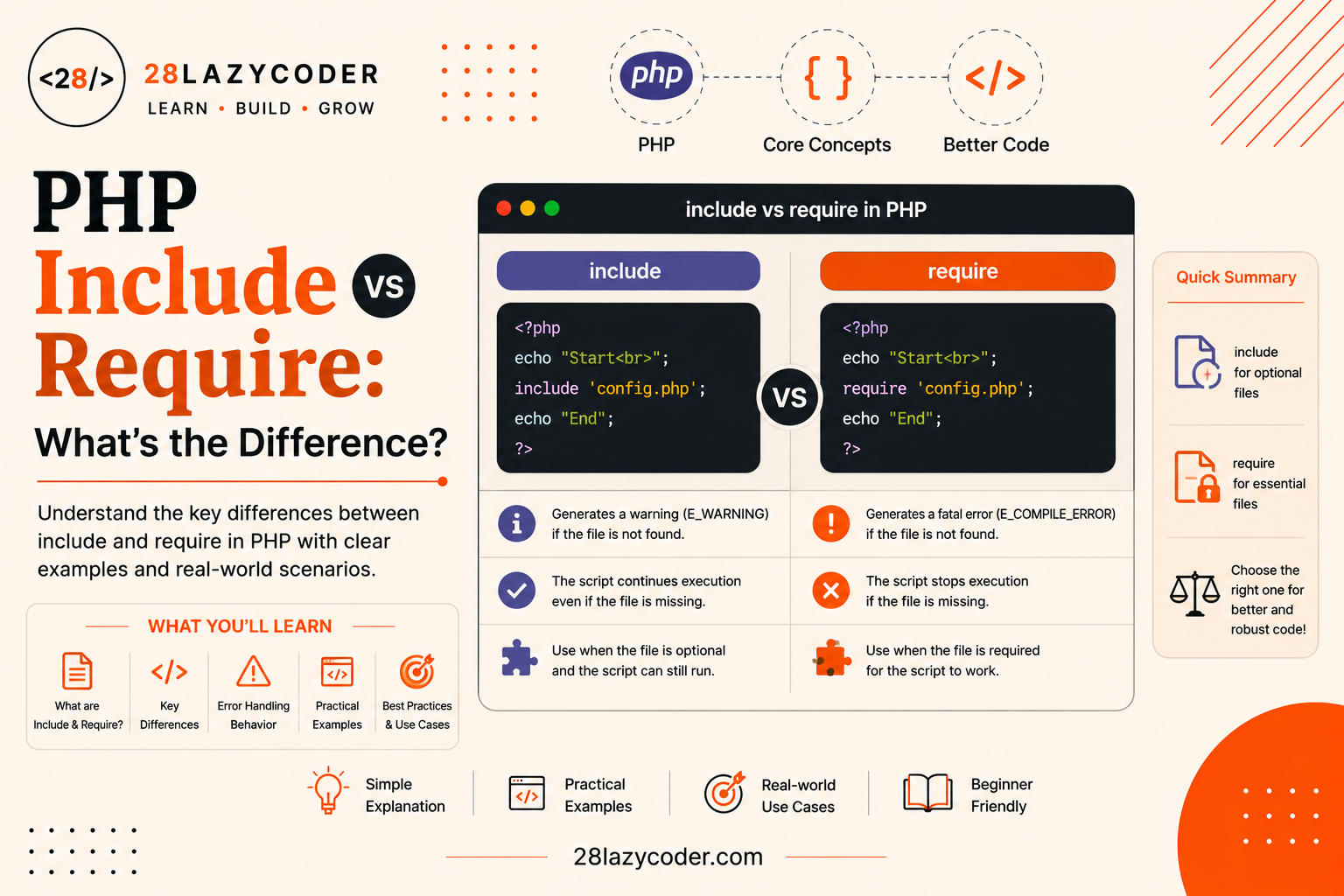
Here’s the entire difference between include and require, boiled down to one sentence: they behave identically when the file exists, and differently only when the file is missing or broken.
| If the file exists | If the file is missing | |
|---|---|---|
include | Works normally | Shows a warning, script keeps running |
require | Works normally | Throws a fatal error, script stops immediately |
According to the official PHP manual, require behaves identically to include, except that upon failure it also produces a fatal E_COMPILE_ERROR level error, whereas include only produces a warning, allowing the script to continue.
Simple analogy: Imagine you’re baking, and a recipe calls for vanilla extract. If it’s genuinely optional, you might just shrug and skip it, your cake still comes out of the oven (that’s include, a missing file just triggers a warning and life goes on). But if the recipe calls for flour, and you don’t have any, there’s no point continuing at all, there’s nothing to bake (that’s require, a missing file stops the whole script cold).
Seeing the Difference in Action
Let’s see exactly what happens when the included file doesn’t exist, for each one:
php
<?php
// Using include with a missing file
echo "Before include<br>";
include 'does-not-exist.php';
echo "After include, script kept running!<br>";
Output:
Before include
Warning: include(does-not-exist.php): Failed to open stream...
After include, script kept running!
php
<?php
// Using require with a missing file
echo "Before require<br>";
require 'does-not-exist.php';
echo "This line never runs!<br>";
Output:
Before require
Fatal error: Uncaught Error: Failed opening required 'does-not-exist.php'
Explaining what happened: With include, PHP complains but keeps going, so the rest of your page still renders, just without whatever the missing file was supposed to provide. With require, PHP treats the missing file as a dealbreaker and halts execution entirely, nothing after that line runs at all.
What About include_once and require_once?
Both include and require also have a “once” version: include_once and require_once. They work exactly like their regular counterparts, with one added rule: if that exact file has already been included anywhere earlier in the script, PHP simply skips including it again.
php
<?php
// functions.php
function greetUser($name) {
    echo "Hello, $name!";
}
php
<?php
// index.php
include_once 'functions.php'; // Included normally
include_once 'functions.php'; // Skipped, already included
greetUser('Ashu'); // Works fine either way
Without the _once versions, including the same file with functions in it twice would cause a “Cannot redeclare function” fatal error, since PHP doesn’t allow defining the same function name more than once.
Why Would the Same File Get Included Twice?
This is a fair question, why would anyone accidentally include the same file more than once? It’s more common than it sounds, especially in larger projects:
- Multiple files each including a shared dependency. If
header.phpandsidebar.phpboth independently includeconfig.php, and your main page includes all three,config.phpends up being included multiple times unless you use the “once” version. - Reusable components used in loops or multiple places on the same page. A
functions.phpfile might get pulled in by several different template parts of the same page.
Best Practice: As a general rule, use
include_onceorrequire_oncefor files that define functions, classes, or constants, and plainincludeorrequirefor files that just output content, like a header or a repeated advertisement block, where being run more than once wouldn’t cause a technical conflict.
How PHP Actually Handles the Included Code
When PHP hits an include or require statement, it essentially pauses the current file’s execution, jumps into the target file, runs any PHP code there, and then continues right back where it left off in the original file.
php
<?php
// header.php
echo "<header>My Website</header>";
php
<?php
// index.php
echo "Before header";
include 'header.php';
echo "After header";
Output: Before header<header>My Website</header>After header
Variables Are Shared Between Files
Here’s a detail that surprises a lot of beginners: an included file has access to all the variables already defined in the file that included it, and vice versa. There’s no isolated “sandbox,” the included file’s code effectively runs as if it were typed directly into that spot.
php
<?php
// greeting.php
echo "Hello, $username!";
php
<?php
// index.php
$username = "Ashu";
include 'greeting.php'; // Can see $username, because it's in scope
Output: Hello, Ashu!
Which One Should You Actually Use?
There’s no single “correct” answer for every situation, it genuinely depends on whether your page can function without that file:
- Use
require(orrequire_once) for anything the page absolutely cannot run correctly without, like a database connection file, a critical configuration file, or a core class definition. - Use
include(orinclude_once) for anything that’s helpful but not essential, like a sidebar widget, an optional banner, or a “related posts” section, something where the page should still mostly work even if that one piece fails to load.
Real-world use case: A typical PHP-driven website’s index.php might use require_once 'config.php'; right at the top, since nothing on the page can work without database credentials, but later use include 'sidebar-ad.php'; for a promotional banner, since the main content should still display perfectly fine even if that one file goes missing.
Real-World Use Case: WordPress and Included Files
If you’ve read our guide on the WordPress template hierarchy, you already know WordPress themes are built from many smaller template files working together. Under the hood, functions like get_header() and get_footer() actually use PHP’s locate_template() function, which itself relies on include to pull in the correct header.php or footer.php file into the current template.
This same idea applies directly to your own PHP projects too. If you’ve followed along with our guide on custom WordPress theme development, splitting a theme into header.php, footer.php, and individual template parts is a real-world example of exactly the file-organization benefits covered earlier in this guide.
Common Beginner Mistakes
- Using
includefor a critical file, like a database connection, then being confused later when the page renders a broken, half-working page instead of clearly failing. - Using
requirefor a purely optional file, like a small “related articles” widget, causing the entire page to crash if that one file happens to go missing. - Forgetting the
_onceversions when including files with function or class definitions, leading to a confusing “Cannot redeclare function” fatal error. - Assuming
include()andrequire()are regular functions, using unnecessary parentheses likeinclude('file.php');. They’re actually language constructs, not functions, though the parentheses don’t cause an error, they’re not required either. - Using absolute file paths that only work on one computer, causing the include to fail once the project is moved to a different server or folder structure.
- Not checking file paths carefully, especially when including files from different folder levels, a very common source of “file not found” warnings and errors.
Quick Comparison Table
| Concept | What It Does | Missing File Behavior |
|---|---|---|
include | Pulls in a file’s code | Warning, script continues |
require | Pulls in a file’s code | Fatal error, script stops |
include_once | Same as include, but skips if already included | Warning, script continues |
require_once | Same as require, but skips if already included | Fatal error, script stops |
Scenario-Based Practice
Scenario 1: A Missing Database Config File
Problem: Your index.php uses include 'db-config.php';, but that file was accidentally deleted from the server. The page loads with a visible PHP warning at the top, followed by broken, half-rendered content, since the rest of the script tried to run anyway without valid database credentials.
Solution: Switch to require 'db-config.php'; (or better, require_once). Since the database connection is essential, you want the script to stop immediately and clearly with a fatal error, rather than limping along and producing confusing, broken output further down the page.
Scenario 2: “Cannot Redeclare Function” Error
Problem: Your project includes functions.php from both header.php and sidebar.php. When both of those get included on the same page, PHP throws a fatal “Cannot redeclare function greetUser()” error.
Solution: Change every include 'functions.php'; to include_once 'functions.php'; (or require_once if the functions are essential). This way, no matter how many different files try to include it, PHP will only actually load it the first time.
Scenario 3: An Optional Promotional Banner
Problem: You added a seasonal promotional banner using require 'promo-banner.php';. During a routine cleanup, a teammate accidentally deleted the file, and now the entire website is down with a fatal error, even though the banner was never critical.
Solution: Since the banner is a “nice to have,” not something the page truly depends on, switch it to include 'promo-banner.php'; instead. If the file goes missing again in the future, visitors will just miss out on the banner rather than losing access to the whole page.
Scenario 4: Slightly Different Behavior Across Two Servers
Problem: Your PHP project runs perfectly on your local computer but throws “failed to open stream” warnings once deployed to the live server.
Solution: This is almost always a file path issue. Check whether you’re using a hardcoded absolute path (like /Users/yourname/project/config.php) that only exists on your local machine. Using a dynamic path built with __DIR__ (a built-in PHP constant that always points to the current file’s own folder) makes the include path work correctly no matter which server it runs on.
Interview Questions on include vs require
Q1. What is the core difference between include and require in PHP? Both pull the code of another file into the current script and behave identically when that file exists. The real difference only shows up when the file is missing: include triggers a warning and lets the script keep running, while require triggers a fatal error and stops the script immediately.
Q2. When would you choose require over include? Whenever the script genuinely cannot function correctly without that file, like a database connection script, essential configuration values, or a core class definition. If the missing file would leave the page in a broken, half-working state anyway, it’s better to fail loudly and immediately with require.
Q3. What problem do include_once and require_once solve? They prevent the exact same file from being included more than once during a single script’s execution. This matters most for files containing function or class definitions, since including them twice would otherwise cause a fatal “Cannot redeclare function” or “Cannot redeclare class” error.
Q4. Can an included file access variables from the file that included it? Yes. Included files share the same variable scope as the point where they were included, there’s no isolation between them. A variable defined before the include or require statement is directly accessible inside the included file, and vice versa.
Q5. What actually happens internally when PHP processes a require statement? PHP pauses execution of the current script at that exact line, opens and runs the target file’s PHP code as if it were pasted directly into that spot, and then resumes running the rest of the original script immediately afterward.
Q6. Is it correct to write include() and require() with parentheses, like function calls? It’s allowed and won’t cause an error, but it’s technically misleading. include and require are language constructs, not functions, so the parentheses aren’t required. Using them without parentheses, like include 'file.php';, more accurately reflects how PHP actually treats them.
Interview Tip: If asked to explain the difference, lead with the one-sentence version first, “identical when the file exists, different only on failure”, then follow up with a concrete example of when you’d choose each one. That shows you understand the reasoning, not just the rule.
Frequently Asked Questions
Q1. Does include_once make a script slower than a plain include? The difference is negligible in almost all real-world cases. PHP has to check whether the file was already included, which adds a tiny bit of overhead, but it’s not something you’d typically need to worry about unless you’re including files an extremely large number of times in a tight loop.
Q2. Can I use include or require inside an if statement or a function? Yes. Both work perfectly fine inside conditional blocks, loops, and functions, letting you conditionally load a file only when it’s actually needed, which can be a genuinely useful performance technique for large projects.
Q3. What happens if I include a file that contains HTML instead of PHP code? It works exactly as you’d expect, any plain HTML inside the included file is output directly, exactly as if you’d typed that HTML at that exact spot in the including file. This is actually how many PHP-based header and footer files work.
Q4. Is require_once always the “safest” choice to default to? It’s a very safe default for shared function and class files, since it avoids both the “missing file” and “duplicate declaration” problems at once. However, it’s not automatically correct for genuinely optional content, where you’d still want the softer include or include_once behavior instead.
Q5. Do include and require work differently across operating systems? No, the core behavior is identical everywhere PHP runs. The most common cross-server issue isn’t include vs require itself, it’s file paths, since Windows and Linux servers can differ in path formatting, which is why using dynamic paths like __DIR__ is recommended.
Q6. Can I include a file from a completely different folder or a parent directory? Yes, using a relative path (like ../config.php to go up one directory) or an absolute path. Just keep in mind that relative paths are calculated based on the currently executing script’s location, which can sometimes cause confusion in more complex folder structures.
Conclusion
include and require might look almost interchangeable at first glance, and honestly, most of the time they behave identically. The entire decision comes down to one simple question: if this file goes missing, should my page keep limping along, or should it stop immediately and clearly?
Once that clicks, choosing between include, require, include_once, and require_once stops feeling like a guessing game, and starts feeling like a deliberate decision based on how critical each piece of your project actually is.
The best way to make this stick is hands-on practice: take a small PHP project of your own, deliberately rename one of your included files to simulate it going missing, and watch exactly how your script behaves with include versus require.
Trusted Sources & References
This guide is grounded in official documentation. For deeper reading, these are reliable places to go:
- PHP Manual — require the official reference explaining fatal error behavior
- PHP Manual — include the official reference explaining warning behavior
- PHP Manual — require_once official documentation on the “once” behavior
- PHP Manual — include_once official documentation on avoiding duplicate inclusion
- W3Schools — PHP Include Files beginner-friendly interactive examples
We recommend bookmarking the official PHP Manual it’s the most authoritative reference for PHP language features.
Continue Learning
Want to build on what you just learned? Check out these related guides on 28LazyCoder:
- PHP Variables Explained for Beginners
- PHP Arrays Explained: A Complete Beginner’s Guide with Examples
- PHP Conditional Statements Explained: A Beginner’s Guide with Examples
- PHP Data Types Explained: A Complete Beginner’s Guide with Examples
- WordPress Template Hierarchy Explained: A Beginner’s Guide
- Custom WordPress Theme Development: A Beginner’s Guide
Explore more tutorials on 28LazyCoder.