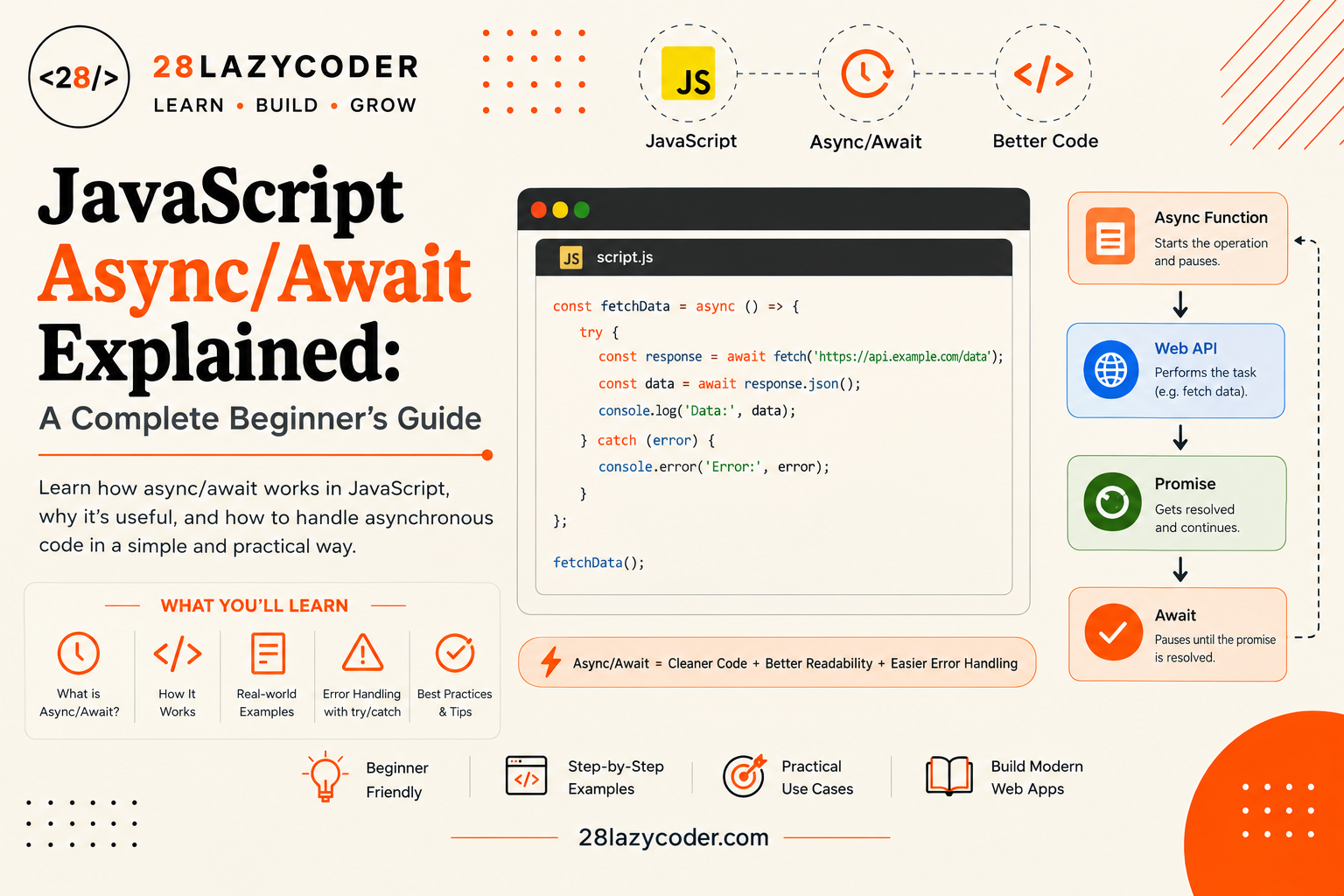
Have you ever written a bunch of .then() chains and lost track of which bracket closes which? I remember the exact moment async/await clicked for me. I was fetching a user’s profile, then their posts, then their comments, and my code had turned into a staircase of .then() blocks going down the page. A senior developer glanced at my screen and said, “Just use await.” I had no idea what that meant, but by the end of that afternoon, my messy staircase turned into code that read like a simple to-do list, top to bottom.
That’s exactly what async/await does for you. In this guide, we’ll build it up slowly, using plain language and everyday comparisons, so by the end you’ll be able to write clean, readable asynchronous code without getting lost.
If Promises are still a bit fuzzy for you, it’s worth reading our guide on JavaScript Promises first, since async/await is built directly on top of them.
What Is Async/Await in JavaScript?
Async/await is a way of writing asynchronous code (code that deals with tasks which take time, like fetching data from a server) so that it looks and reads like normal, step-by-step code, instead of a chain of .then() calls.
Here’s the important bit: async/await isn’t a brand new feature that replaces Promises. It’s just a different style of writing them. Under the hood, every async function is still working with Promises. Think of it like handwriting versus typing the same letter both get the same message across, but one is easier to read quickly.
Why Do We Need Async/Await If We Already Have Promises?
Promises solved a real problem (they cleaned up the “callback hell” mess of nested functions), but chaining lots of .then() calls still has its own quirks:
- You have to remember to
returninside every.then(), or the next step won’t get the right value. - Long chains can still get hard to follow, especially with conditional logic mixed in.
- Debugging a chain of
.then()calls in your browser tools isn’t always as smooth as debugging regular code.
Simple analogy: Imagine giving someone directions to your house. Writing it as a Promise chain is like saying, “After you take a left, then take the second right, then park, and then walk to the blue door.” Writing it with async/await is like saying, “Take a left. Take the second right. Park. Walk to the blue door.” Same directions, but the second version reads like a normal list of steps instead of one long sentence.
The Two Keywords: async and await
There are only two new keywords to learn here:
asyncyou put this in front of a function to mark it as asynchronous. It changes what the function returns (always a Promise) and unlocks the ability to useawaitinside it.awaityou put this in front of a Promise to “pause” the function at that line until the Promise settles (either succeeds or fails), then continue with the result.
Simple analogy: await is like pressing pause on a video while you wait for a page to load, and pressing play again the moment it’s ready. Nothing else in your function moves forward until that one line finishes.
Writing Your First Async Function
Let’s start with the simplest possible example. Any function can be turned into an async function by adding the async keyword before it.
javascript
async function greet() {
  return "Hello from an async function!";
}

greet().then((message) => console.log(message));
// "Hello from an async function!"
The async Keyword Explained
Notice something interesting here: even though greet() just returns a plain string, we still had to use .then() to read it. That’s because an async function always returns a Promise, no matter what you put inside the return statement. JavaScript automatically wraps your returned value in a Promise for you.
So these two functions behave the same way from the outside:
javascript
// Manually creating a Promise
function greetManual() {
  return new Promise((resolve) => {
    resolve("Hello!");
  });
}

// Letting async do it for you
async function greetAsync() {
  return "Hello!";
}
The await Keyword Explained
The real power shows up when you use await inside an async function. It lets you “wait” for a Promise to settle, and grab the actual result, without needing a .then() at all.
javascript
function orderPizza() {
  return new Promise((resolve) => {
    setTimeout(() => resolve("Your pizza has arrived!"), 2000);
  });
}

async function handleOrder() {
  console.log("Order placed. Waiting for the pizza...");
  const result = await orderPizza(); // pauses here for 2 seconds
  console.log(result); // "Your pizza has arrived!"
}

handleOrder();
Important rule: await only works inside a function marked async. If you try to use it in a normal function, JavaScript will throw a syntax error. This is one of the most common beginner slip-ups, so keep it in mind as you practice.
Handling Errors with Try/Catch
With .then() chains, you handle errors using .catch(). With async/await, you go back to a pattern you may already recognize from other parts of JavaScript: try and catch blocks.
javascript
async function handleOrder() {
  try {
    const result = await orderPizza();
    console.log(result);
  } catch (error) {
    console.log("Something went wrong:", error);
  }
}
Here’s how it works: JavaScript runs everything inside the try block normally. But if any awaited Promise gets rejected (fails), execution immediately jumps down to the catch block, skipping whatever code was left in try.
Simple analogy: Think of try/catch like a safety net under a tightrope walker. The walker (your code) moves forward step by step. If they slip at any point, the net (catch) catches them right away, instead of letting them fall all the way to the ground with no plan.
You can also add a finally block, just like with Promises, for code that should run no matter what happened:
javascript
async function handleOrder() {
  try {
    const result = await orderPizza();
    console.log(result);
  } catch (error) {
    console.log("Something went wrong:", error);
  } finally {
    console.log("Order process finished.");
  }
}
Async/Await vs Promises: Which Should You Use?
This is one of the most common questions beginners ask, so let’s put them side by side using the same task.
javascript
// Using .then() and .catch()
function getUser() {
  fetch("https://jsonplaceholder.typicode.com/users/1")
    .then((response) => response.json())
    .then((data) => console.log(data.name))
    .catch((error) => console.log(error));
}

// Using async/await
async function getUser() {
  try {
    const response = await fetch("https://jsonplaceholder.typicode.com/users/1");
    const data = await response.json();
    console.log(data.name);
  } catch (error) {
    console.log(error);
  }
}
Both versions do exactly the same thing. Neither one is “faster” than the other, because async/await is just a friendlier way of writing Promise code the JavaScript engine still runs it as Promises behind the scenes.
In general, most developers today reach for async/await because:
- It reads top to bottom, like normal code.
- Error handling with
try/catchfeels more familiar than chaining.catch(). - It’s easier to mix with regular
ifstatements, loops, and variables.
Promise chains still show up a lot in real code (and in libraries you’ll use), so it’s worth being comfortable reading both styles, even if you prefer writing with async/await.
Real-World Example: Fetching Data with Async/Await
Let’s put this into a practical example: fetching a list of users from an API and only showing the ones that are active.
javascript
async function getActiveUsers() {
  try {
    const response = await fetch("https://jsonplaceholder.typicode.com/users");

    if (!response.ok) {
      throw new Error("Server responded with an error");
    }

    const users = await response.json();
    const activeUsers = users.filter((user) => user.id <= 5);

    console.log(activeUsers);
    return activeUsers;
  } catch (error) {
    console.log("Could not load users:", error);
  }
}

getActiveUsers();
Walking through this line by line:
await fetch(...)pauses until the network request comes back, and stores the response.response.okis a built-in property that tells you whether the request succeeded (a plainfetch()call doesn’t automatically reject on a 404 or 500 error, so checking this yourself matters).await response.json()pauses again while the response body is converted into a usable array of objects.- If anything fails along the way, the
catchblock steps in instead of letting your app crash silently.
Running Multiple Async Tasks at Once
One thing that trips beginners up: if you await several tasks one after another, they run in order, even if they don’t depend on each other. This can waste time.
Sequential Await (Slow)
javascript
async function loadDashboard() {
  const profile = await fetchProfile();   // waits 1 second
  const posts = await fetchPosts();       // then waits another 1 second
  const settings = await fetchSettings(); // then waits another 1 second

  console.log(profile, posts, settings);
}
// Total time: roughly 3 seconds
Each await blocks the next line until it finishes, so these three unrelated requests end up running back-to-back instead of together.
Parallel Await with Promise.all() (Fast)
If the tasks don’t depend on each other’s results, you can start them all at once and wait for every one of them together using Promise.all() (a built-in tool that takes an array of Promises and resolves once all of them are done):
javascript
async function loadDashboard() {
  const [profile, posts, settings] = await Promise.all([
    fetchProfile(),
    fetchPosts(),
    fetchSettings(),
  ]);

  console.log(profile, posts, settings);
}
// Total time: roughly 1 second, since all three run together
Simple analogy: Sequential await is like boiling three pots of water one after another on a single burner. Promise.all() is like putting all three pots on three separate burners at the same time you get all your water boiled in the time it takes to boil just one pot.
Common Beginner Mistakes with Async/Await
Forgetting the async keyword
You can’t use await inside a regular function. If you forget to add async before the function keyword, JavaScript will throw a syntax error right away. Always check that the surrounding function is marked async before adding an await inside it.
Not wrapping await in a try/catch
If an awaited Promise gets rejected and there’s no try/catch around it, you’ll get an unhandled error, and your function will stop running at that point without a graceful fallback. Always wrap risky await calls (like network requests) in try/catch.
Awaiting things one by one when they don’t depend on each other
As shown above, unrelated tasks awaited one after another waste time. If your tasks don’t need each other’s results, use Promise.all() to run them together instead.
Forgetting that async functions always return a Promise
Even if your function returns a plain number or string, calling that async function will always give you back a Promise, not the raw value. You still need await or .then() to unwrap the actual result outside the function.
Quick Comparison Table
| Concept | What It Does |
|---|---|
async function | Marks a function as asynchronous; it always returns a Promise |
await | Pauses the function at that line until a Promise settles |
try { } | Runs your normal code, watching for errors |
catch (error) { } | Runs if an awaited Promise is rejected |
finally { } | Runs no matter what happened, success or failure |
Promise.all() | Runs several Promises together instead of one after another |
.then() / .catch() | The older, chain-based way of handling the same Promises |
Did You Know? The
async/awaitkeywords were added to JavaScript in the ES2017 (ES8) update. Before that, developers relied only on.then()chains or third-party libraries to get similar clean-looking code.
Scenario-Based Practice
Scenario 1: A single API call
Problem: You need to fetch a product’s details from https://api.example.com/product/10 and log its name. If the request fails, log a friendly error message instead of letting the app crash.
Solution:
javascript
async function getProduct() {
  try {
    const response = await fetch("https://api.example.com/product/10");
    const product = await response.json();
    console.log(product.name);
  } catch (error) {
    console.log("Sorry, we couldn't load this product right now.");
  }
}
Scenario 2: Two calls that depend on each other
Problem: You need to fetch a user first, and only after that succeeds, fetch that user’s orders using their ID.
Solution:
javascript
async function getUserOrders() {
  try {
    const userResponse = await fetch("https://api.example.com/user/1");
    const user = await userResponse.json();

    const ordersResponse = await fetch(`https://api.example.com/orders/${user.id}`);
    const orders = await ordersResponse.json();

    console.log(orders);
  } catch (error) {
    console.log("Could not load orders:", error);
  }
}
Here, await chaining actually makes sense, because the second request truly can’t start until the first one finishes we need the user’s ID first.
Scenario 3: Three calls that don’t depend on each other
Problem: You need the weather, the news headlines, and the stock price all at once, and none of them depend on the others.
Solution:
javascript
async function loadHomepage() {
  try {
    const [weather, news, stocks] = await Promise.all([
      fetch("https://api.example.com/weather").then((res) => res.json()),
      fetch("https://api.example.com/news").then((res) => res.json()),
      fetch("https://api.example.com/stocks").then((res) => res.json()),
    ]);

    console.log(weather, news, stocks);
  } catch (error) {
    console.log("Something failed to load:", error);
  }
}
Scenario 4: Handling a slow or unreachable server gracefully
Problem: You want to show a “Loading…” message before the request starts, and a “Failed to load” message if it errors out, using async/await.
Solution:
javascript
async function loadProfile() {
  console.log("Loading...");
  try {
    const response = await fetch("https://api.example.com/profile");
    if (!response.ok) {
      throw new Error("Bad response from server");
    }
    const profile = await response.json();
    console.log("Profile loaded:", profile);
  } catch (error) {
    console.log("Failed to load. Please try again.");
  }
}
Interview Questions & Answers
Interview Tip: Interviewers often care less about you reciting a definition and more about whether you can explain why async/await exists and when to reach for
Promise.all()instead of sequentialawait. Practice saying your answers out loud, not just reading them.
1. What is async/await in JavaScript?
Async/await is a syntax for working with Promises that lets asynchronous code be written and read like normal, synchronous, step-by-step code. The async keyword marks a function as asynchronous (it always returns a Promise), and await pauses execution inside that function until a Promise settles.
2. Does async/await replace Promises?
No. Async/await is built entirely on top of Promises it’s a different syntax for the same underlying mechanism, not a separate feature. Every async function still returns a Promise, and await still works by waiting for a Promise to settle.
3. What does an async function return if you don’t explicitly return a Promise?
It still returns a Promise. JavaScript automatically wraps whatever value you return (even a plain string or number) inside a resolved Promise, so the caller always needs to use await or .then() to get the actual value.
4. How do you handle errors in an async function?
By wrapping the await calls in a try/catch block. If any awaited Promise is rejected, control jumps to the catch block immediately, letting you handle the error gracefully instead of crashing the app. A finally block can be added for cleanup code that should always run.
5. What’s the difference between running awaits sequentially and using Promise.all()?
Sequential await calls run one after another, so the total time is the sum of each task’s time even if the tasks don’t depend on each other. Promise.all() starts all the given Promises at roughly the same time and waits for all of them together, so the total time is closer to whichever task takes the longest, not the sum of all of them.
6. Can you use await outside of an async function?
Not inside a regular function you’ll get a syntax error. However, modern JavaScript modules support “top-level await,” which allows await to be used directly at the top level of a module file, outside of any function, but this is a more advanced, environment-specific feature.
Frequently Asked Questions
What is async/await in simple terms?
It’s a way to write asynchronous JavaScript code (code that waits on things like network requests) so it looks like a normal, top-to-bottom list of steps, instead of a chain of .then() calls.
Is async/await faster than Promises?
No, they perform the same way under the hood. Async/await is just a cleaner way to write Promise-based code; the actual speed of your program depends on the tasks themselves, not which syntax you use.
Do I need to learn Promises before learning async/await?
Yes, it really helps. Since async/await is built directly on top of Promises, understanding states like “pending,” “fulfilled,” and “rejected” makes it much easier to understand what await is actually waiting for.
What happens if I forget to add a try/catch around an await?
If the awaited Promise gets rejected and there’s no try/catch to handle it, you’ll get an unhandled error, and your function will stop executing at that line without a proper fallback. It’s best practice to always guard your await calls, especially ones involving network requests.
Can I use await inside a regular (non-async) function?
No. The await keyword can only be used inside a function that’s marked with async. Trying to use it elsewhere will cause a syntax error, which is one of the most common early mistakes beginners run into.
Why does my async function return “[object Promise]” instead of my actual value?
This happens when you try to use the result of an async function without awaiting it or attaching a .then(). Remember, async functions always return a Promise you have to unwrap it to get the real value inside.
Conclusion
Async/await doesn’t teach you anything JavaScript couldn’t already do with Promises, it just gives you a cleaner, more readable way to write it. Once you’re comfortable marking functions async, pausing with await, and catching errors with try/catch, most real-world code (fetching data, loading files, waiting on timers) starts to feel a lot less intimidating.
The best way to make this stick is to practice. Try rewriting one of your old .then() chains using async/await, or build a small script that fetches data from a public API like jsonplaceholder.typicode.com and logs it to the console. The more you write it yourself, the faster it’ll become second nature.
Trusted Sources & References
This guide is grounded in official documentation. For deeper reading on any of these topics, these are reliable places to go:
- MDN — async function the official reference for the
asynckeyword - MDN — await the official reference for the
awaitoperator - MDN — Using Promises background on the Promise mechanics async/await is built on
- MDN — try…catch full reference for error handling in JavaScript
- MDN — Promise.all() running multiple Promises together
- W3Schools — JavaScript Async beginner-friendly interactive examples
We recommend bookmarking MDN Web Docs it’s the most trusted, community-maintained reference for JavaScript and the web in general.
Continue Learning
Want to build on what you just learned? Check out these related guides on 28LazyCoder:
- JavaScript Promises Explained: A Complete Beginner’s Guide
- JavaScript Functions: A Complete Guide with Examples
- JavaScript ES6 Features Explained: A Complete Beginner’s Guide
- JavaScript Events Explained: A Complete Beginner’s Guide
- JavaScript Array Methods Explained: A Complete Beginner’s Guide with Examples
- JavaScript Objects: A Complete Beginner’s Guide with Examples
Explore more tutorials on 28LazyCoder.