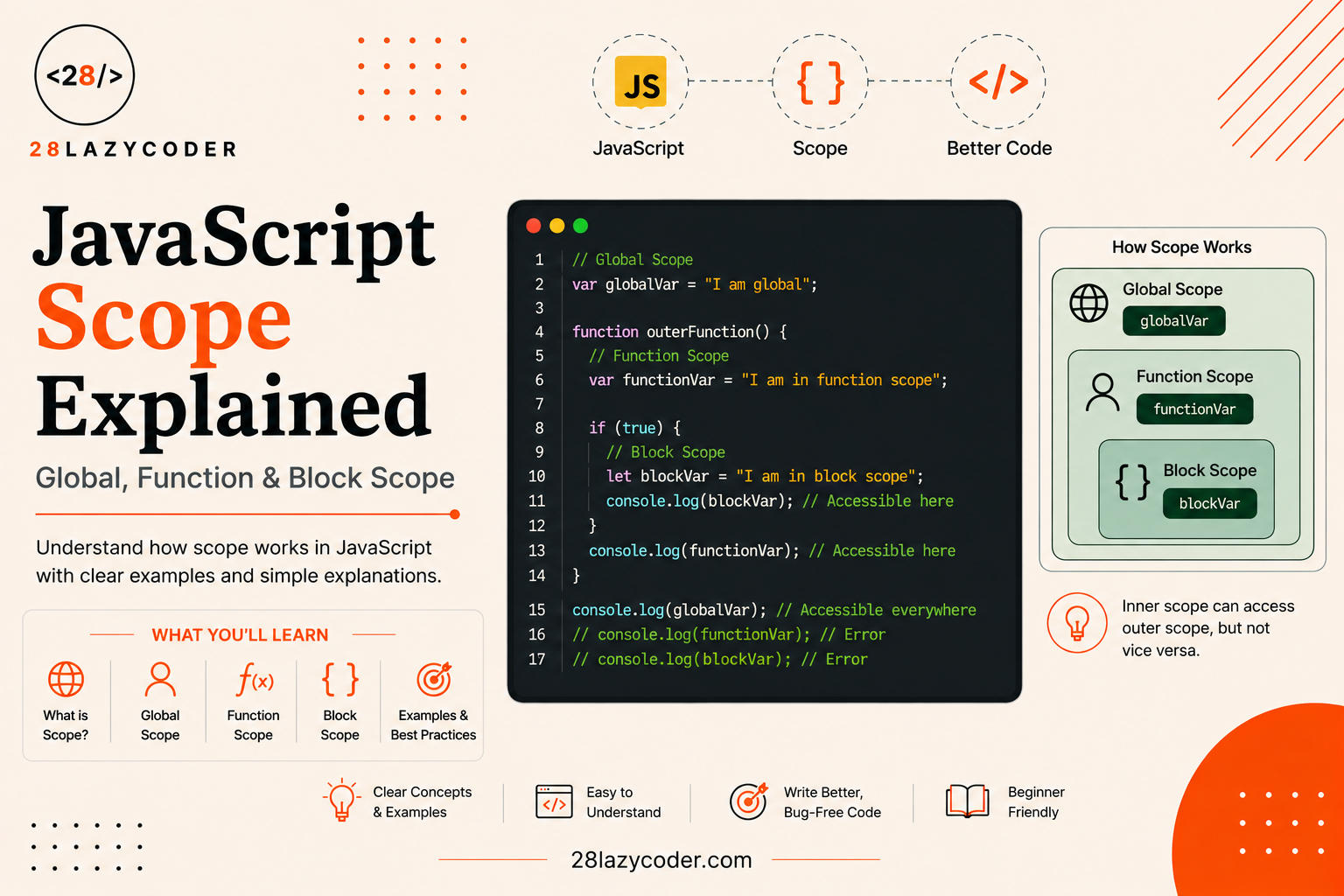
Have you ever declared a variable in one part of your code, and then got a confusing error like ReferenceError: x is not defined when you tried to use it somewhere else? Or maybe the opposite happened a variable you thought was “private” to one function somehow leaked out and messed up a value somewhere else in your app.
If that’s happened to you, you’re not doing anything wrong. You’ve just bumped into scope one of those JavaScript ideas that nobody explains clearly enough when you’re starting out, even though it quietly controls almost everything you write.
The good news? Scope isn’t complicated once someone walks you through it with plain words and real examples instead of textbook definitions. That’s exactly what we’re going to do in this guide.
By the end, you’ll know exactly where a variable is “visible” in your code, why some of your variables disappear when you expect them to stick around (and vice versa), and how to avoid the sneaky bugs that scope confusion causes including the classic loop bug that trips up almost every beginner at least once.
If you haven’t already, it’s worth skimming our guide on var, let, and const: The Difference That Actually Matters first, since scope is really the “why” behind that whole topic. But don’t worry we’ll cover everything you need right here too.
What Is Scope in JavaScript?
Let’s start with a simple, everyday comparison.
Think about your house. You have a bedroom, a kitchen, and a living room. Some things like your phone charger might only exist in your bedroom. You can’t reach for it while you’re standing in the kitchen. But some things, like the front door key hanging near the entrance, are accessible from anywhere in the house.
Scope works the same way for variables in JavaScript. It’s simply the answer to the question: “From this exact spot in my code, which variables am I allowed to see and use?”
A more formal way to say it: scope defines the area of your code where a particular variable, function, or object is accessible. Outside of that area, JavaScript acts like the variable doesn’t exist at all.
Here’s a tiny example to make this concrete:
js
function bedroom() {
  let charger = "phone charger";
  console.log(charger); // works fine, we're inside the bedroom
}

bedroom();
console.log(charger); // ReferenceError: charger is not defined
The charger variable only exists inside the bedroom function. Once you step outside that function, JavaScript has no idea what charger means just like you can’t grab your phone charger while standing in the kitchen.
Why Should a Beginner Care About Scope?
You might be thinking, “Okay, but why does this actually matter for me?” Fair question. Here’s why scope is worth understanding properly, not just skimming:
- It explains why your variables sometimes “disappear” (they went out of scope).
- It explains why two variables can share the exact same name without clashing.
- It’s the foundation for understanding closures, a topic that shows up constantly in real JavaScript code and in almost every JavaScript job interview.
- It prevents one of the most common categories of bugs: accidentally overwriting a variable you didn’t mean to touch.
Once scope clicks, a lot of “JavaScript is being weird” moments turn into “oh, that makes total sense” moments.
The Three Types of Scope in JavaScript
JavaScript has three main types of scope. We’ll go through each one slowly, with plenty of examples.
- Global Scope — visible everywhere in your code.
- Function Scope — visible only inside a specific function.
- Block Scope — visible only inside a specific
{ }block, like anifstatement or a loop.
Let’s take them one at a time.
Global Scope
A variable has global scope when it’s declared outside of any function or block right at the top level of your script. Because it’s not tucked inside anything, it’s visible from anywhere in your code, including inside every function.
js
let siteName = "28LazyCoder";

function greetUser() {
  console.log("Welcome to " + siteName); // can access siteName just fine
}

greetUser(); // Welcome to 28LazyCoder
console.log(siteName); // also works here
siteName was declared outside any function, so it’s a global variable. Both greetUser() and the rest of the script can freely use it.
Why Global Scope Isn’t Always Your Friend
It’s tempting to make everything global — it’s convenient, right? No worrying about “can I access this variable from here?” But global variables come with real downsides once your code grows beyond a tiny script:
- Naming collisions. If two different parts of a large app (or two different scripts loaded on the same page) both declare a global variable called
data, one will silently overwrite the other. - Harder to debug. A global variable can be changed from literally anywhere in your program, which makes it hard to track down where an unexpected value came from.
- Memory stays reserved longer. Global variables live for as long as your page or app is running, instead of being cleaned up once they’re no longer needed.
A good rule of thumb: keep as few variables global as possible. Only put something in global scope if it genuinely needs to be used across many different parts of your code configuration values, for example, not temporary calculation results.
A Quick Warning: Accidental Globals
Here’s a mistake that catches a lot of beginners off guard. If you assign a value to a variable without using let, const, or var, JavaScript quietly creates a global variable for you — even if you’re inside a function:
js
function calculateTotal() {
  total = 100; // no let/const/var — oops!
}

calculateTotal();
console.log(total); // 100 — it leaked into global scope
This works because of how JavaScript handles undeclared assignments, but it’s almost never what you actually want. Always declare your variables properly with let or const to avoid this trap.
Function Scope
A variable has function scope when it’s declared inside a function using var (or let/const, though those have an extra rule we’ll cover in a moment). It’s only visible inside that function nowhere else.
js
function calculateArea(width, height) {
  var area = width * height;
  console.log(area); // works fine here
  return area;
}

calculateArea(5, 4); // 20
console.log(area); // ReferenceError: area is not defined
The area variable is trapped inside calculateArea(). The moment the function finishes running, that variable is gone, and trying to reach it from outside throws an error.
This is actually a good thing. It means every function gets its own private workspace for variables. You can reuse the same variable name in ten different functions, and none of them will interfere with each other:
js
function orderPizza() {
  let size = "large";
  console.log(size);
}

function orderCoffee() {
  let size = "small";
  console.log(size);
}

orderPizza();  // large
orderCoffee(); // small
Both functions use a variable called size, but because each one lives in its own function scope, they never clash.
Nested Functions Can See Outward
Here’s something important: a function declared inside another function can access the outer function’s variables. But it doesn’t work the other way around.
js
function outerFunction() {
  let message = "Hello from outside!";

  function innerFunction() {
    console.log(message); // can see it — inner functions look outward
  }

  innerFunction();
}

outerFunction(); // Hello from outside!
Think of it like looking through a one-way mirror. The inner function can see out into the room around it, but the outer room can’t see into the inner function’s private space. This “looking outward” behavior is called the scope chain, and it’s the exact mechanism behind closures a topic we’ll touch on later in this guide.
If you want to go deeper on how functions work in general before continuing, our JavaScript Functions guide is a solid companion to this one.
Block Scope
This is the newest of the three, introduced in ES6 (2015) along with let and const. A block is simply any bit of code wrapped in curly braces { } an if statement, a for loop, a while loop, or even a standalone pair of braces.
A variable has block scope when it’s only visible inside the specific block where it was declared.
js
if (true) {
  let secretCode = "1234";
  console.log(secretCode); // works fine, we're inside the block
}

console.log(secretCode); // ReferenceError: secretCode is not defined
secretCode only exists between the opening { and closing } of that if block. Step outside those braces, and it’s gone exactly like charger disappearing outside the bedroom earlier.
Block Scope Only Applies to let and const Not var
This is one of the most important, most-tested-in-interviews facts about JavaScript scope, so let’s slow down here.
var ignores block boundaries. It only respects function boundaries. let and const, on the other hand, respect both.
js
function testVar() {
  if (true) {
    var x = "I ignore blocks";
  }
  console.log(x); // "I ignore blocks" — var leaked out of the if block
}

function testLet() {
  if (true) {
    let y = "I respect blocks";
  }
  console.log(y); // ReferenceError — let stayed inside the if block
}

testVar();
testLet();
This single difference is the reason most modern JavaScript style guides tell you to avoid var entirely and stick to let and const. Block scope makes your code more predictable a variable declared inside an if or a for loop genuinely stays contained there, instead of quietly spilling out and possibly overwriting something you didn’t intend to touch.
For a full breakdown of how var, let, and const differ beyond just scope (hoisting, redeclaration, and more), check out our dedicated guide: var, let, and const: The Difference That Actually Matters.
The Classic Loop Bug (And Why Block Scope Fixes It)
This is one of the most famous JavaScript “gotchas,” and understanding it will genuinely make you a better developer.
js
for (var i = 0; i < 3; i++) {
  setTimeout(function () {
    console.log(i);
  }, 100);
}
// Logs: 3, 3, 3
You might expect this to print 0, 1, 2. Instead, it prints 3 three times. Here’s why: var is function-scoped (or global here), so there’s only one i shared across the entire loop. By the time the setTimeout callbacks actually run even just 100 milliseconds later the loop has already finished, and i has ended up at 3.
Now swap var for let:
js
for (let i = 0; i < 3; i++) {
  setTimeout(function () {
    console.log(i);
  }, 100);
}
// Logs: 0, 1, 2
Because let is block-scoped, JavaScript creates a brand-new i for every single loop iteration. Each setTimeout callback grabs its own private snapshot of i instead of sharing one variable. This is a great real-world reason let exists it’s not just a style preference, it fixes a genuine class of bugs.
If loops themselves still feel shaky, our JavaScript Loops and Iteration guide is a good place to build that foundation first.
Scope Chain: How JavaScript Looks Up Variables
When you reference a variable, JavaScript doesn’t just check one place and give up. It follows a lookup path called the scope chain:
- First, it checks the current (innermost) scope.
- If not found, it checks the next scope out.
- It keeps stepping outward, scope by scope.
- If it reaches global scope and still can’t find the variable, you get a
ReferenceError.
js
let country = "India"; // global scope

function outer() {
  let city = "Delhi"; // function scope

  function inner() {
    let area = "Connaught Place"; // block/function scope
    console.log(area);    // found immediately — innermost scope
    console.log(city);    // not found here, steps out to outer()
    console.log(country); // not found here either, steps out to global
  }

  inner();
}

outer();
This “step outward until found” behavior is exactly what powers closures where an inner function keeps access to variables from an outer function even after that outer function has already finished running. Closures are a slightly more advanced topic, but they’re just scope in action, so understanding scope well now will make closures click much faster later.
Comparison Table: Global vs Function vs Block Scope
| Feature | Global Scope | Function Scope | Block Scope |
|---|---|---|---|
| Declared where | Outside any function or block | Inside a function | Inside { } — if, for, while, etc. |
| Accessible from | Anywhere in the code | Only inside that function | Only inside that block |
| Works with | var, let, const | var, let, const | let, const only |
| Introduced in | Original JavaScript | Original JavaScript | ES6 (2015) |
| Risk of bugs | High (naming collisions) | Medium | Low (most contained) |
| Common use case | App-wide config values | Local calculations inside a function | Loop counters, conditional-only values |
Common Mistakes Beginners Make With Scope
- Using
varout of habit and being surprised when it leaks out ofifblocks or loops. Stick withletandconstin new code. - Forgetting
let/constand accidentally creating a global variable. Always declare your variables explicitly. - Assuming a variable declared inside a function is available outside it. Function-scoped and block-scoped variables genuinely disappear once you leave that function or block that’s the whole point.
- Reusing the same variable name across nested blocks and getting confused about which one is being used. This is called “shadowing” the inner variable temporarily hides the outer one with the same name, for that block only.
- Not realizing loop variables need
let, notvar, when used inside asynchronous code likesetTimeoutor event listeners. This is the loop bug we walked through above.
Interview Questions on JavaScript Scope
These come up often enough in beginner and junior-level JavaScript interviews that it’s worth being able to answer them confidently.
1. What is scope in JavaScript? Scope is the area of your code where a specific variable is accessible. It determines from which parts of your program you’re allowed to read or use a given variable.
2. What are the three types of scope in JavaScript? Global scope, function scope, and block scope.
3. What’s the difference between function scope and block scope? Function scope means a variable is accessible anywhere inside the function it was declared in, regardless of if or loop blocks. Block scope means a variable is accessible only within the specific { } block where it was declared. var only respects function scope, while let and const respect block scope.
4. Why does var behave differently from let and const in loops? Because var is function-scoped, a loop using var shares a single variable across every iteration. let creates a new, separate binding of the variable for each iteration, since it’s block-scoped. This is why asynchronous code (like setTimeout) inside a var loop often logs unexpected values.
5. What happens if you assign a value to a variable without declaring it with let, const, or var? JavaScript creates it as an accidental global variable, even if the assignment happens inside a function. This is considered bad practice and should always be avoided.
6. What is the scope chain? It’s the lookup process JavaScript uses when resolving a variable: it checks the current scope first, then steps outward through each containing scope, until it either finds the variable or reaches global scope and throws a ReferenceError.
7. How does scope relate to closures? A closure happens when an inner function keeps access to variables from its outer function’s scope, even after the outer function has finished executing. Closures exist because of how the scope chain works — understanding scope is the first step to understanding closures.
Scenario-Based Problems
Scenario 1: The Missing Variable
Problem: A beginner writes this code and gets a ReferenceError. Why?
js
function checkAge() {
  if (18 >= 18) {
    let isAdult = true;
  }
  return isAdult;
}

checkAge();
Solution: isAdult is declared with let inside the if block, so it’s block-scoped. It doesn’t exist outside that block not even in the rest of the same function. To fix it, declare isAdult before the if block, so it’s visible at the function level:
js
function checkAge() {
  let isAdult;
  if (18 >= 18) {
    isAdult = true;
  }
  return isAdult;
}

console.log(checkAge()); // true
Scenario 2: The Loop That Logs the Wrong Numbers
Problem: A to-do app is supposed to log the index of each task when its “delete” button is clicked, but every button logs the same, final number instead.
js
var buttons = document.querySelectorAll(".delete-btn");

for (var i = 0; i < buttons.length; i++) {
  buttons[i].addEventListener("click", function () {
    console.log("Deleting task " + i);
  });
}
Solution: var is function/global scoped, so every click handler shares the exact same i, which ends up at its final value by the time anyone clicks a button. Switching to let gives each loop iteration its own separate i:
js
var buttons = document.querySelectorAll(".delete-btn");

for (let i = 0; i < buttons.length; i++) {
  buttons[i].addEventListener("click", function () {
    console.log("Deleting task " + i);
  });
}
If click handlers and event listeners are new to you, our JavaScript Events guide covers this in more detail.
Scenario 3: Accidental Global Overwrite
Problem: Two different functions in a large app both use a variable called total, and one function’s calculation is mysteriously affecting the other’s result.
js
function calculateCartTotal() {
  total = 250; // missing let/const
}

function calculateInvoiceTotal() {
  total = 999; // missing let/const — overwrites the same global!
}

calculateCartTotal();
calculateInvoiceTotal();
console.log(total); // 999 — the cart's total got silently overwritten
Solution: Neither function declared total properly, so both accidentally created (and shared) the same global variable. Declaring each with let or const keeps them properly scoped to their own functions:
js
function calculateCartTotal() {
  let total = 250;
  return total;
}

function calculateInvoiceTotal() {
  let total = 999;
  return total;
}

console.log(calculateCartTotal());    // 250
console.log(calculateInvoiceTotal()); // 999
Conclusion
Scope isn’t some abstract rule you memorize for an exam it’s the reason your code behaves the way it does, every single time you write a variable. Global scope makes a variable available everywhere, function scope keeps it locked inside a function, and block scope (thanks to let and const) keeps it locked inside a specific { } block like an if statement or a loop.
Once you internalize this, a lot of “JavaScript is being weird” moments leaking variables, loop bugs, accidental globals stop feeling random. They become predictable, explainable, and easy to fix. And as a bonus, you’re now most of the way to understanding closures too, since closures are really just scope doing its job across function boundaries.
The best way to make this stick is to actually break it on purpose. Open your browser console, write a few var vs let examples like the ones above, and watch what happens. Confusion turns into confidence a lot faster when you see the errors yourself instead of just reading about them.
FAQs
Q1. What is the default scope of a variable in JavaScript? If a variable is declared outside any function or block, it has global scope by default and is accessible everywhere in your code.
Q2. Is let block-scoped or function-scoped? let is block-scoped. It’s only accessible within the { } block where it was declared — including if statements, loops, and standalone blocks.
Q3. Does var support block scope? No. var only supports function scope (or global scope, if declared outside any function). It ignores block boundaries like if and for.
Q4. What is the scope chain in JavaScript? It’s the order JavaScript follows when looking up a variable starting from the innermost scope and moving outward, scope by scope, until the variable is found or a ReferenceError is thrown.
Q5. Why should I avoid global variables? Global variables can be changed from anywhere in your code, which makes bugs harder to trace and increases the risk of two different parts of your app accidentally overwriting the same variable name.
Q6. Are closures the same thing as scope? Not exactly. Scope is the rule that determines where a variable is visible. A closure is what happens when a function “remembers” variables from its outer scope even after that outer function has finished running. Closures depend on scope, but they’re a separate (and slightly more advanced) concept.
Continue Learning
Want to keep building your JavaScript foundation? These guides pair naturally with this one:
- var, let, and const: The Difference That Actually Matters
- JavaScript Functions: A Complete Guide with Examples
- JavaScript Loops and Iteration: A Complete Beginner’s Guide
- JavaScript Conditional Statements: A Complete Beginner’s Guide
- JavaScript Events Explained: A Complete Beginner’s Guide
- JavaScript ES6 Features Explained: A Complete Beginner’s Guide
You can also browse every JavaScript tutorial on 28LazyCoder’s JavaScript category page, or head back to the 28LazyCoder homepage for the full library of beginner-friendly coding guides.