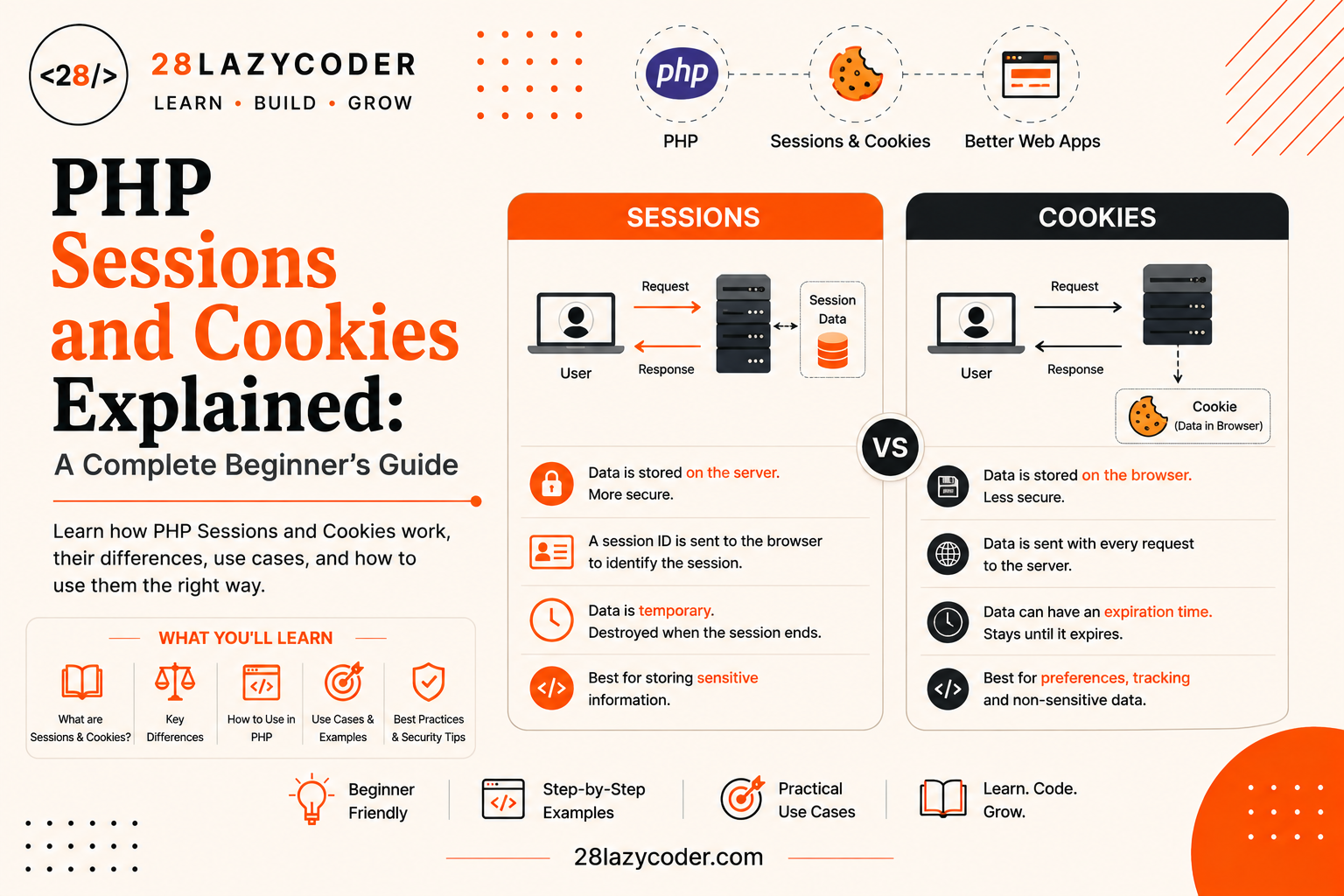
Why This Confused Me at First
The first login system I ever built looked perfect on my screen. I typed my username and password, clicked “Login,” and saw “Welcome back!” right where it should be. I was proud of myself for about ten seconds, and then I clicked to a different page on my own site, and it acted like I had never logged in at all.
I was confused because, in my head, once you “log in,” the website should just know you’re logged in everywhere. But that’s not how the web works by default. Every single page load is like meeting a stranger for the first time. The server has zero memory of who you were on the last page unless you specifically give it a way to remember you.
That “way to remember you” is exactly what sessions and cookies are for. Once I understood how they worked, logins, shopping carts, and “remember me” checkboxes all stopped feeling like magic and started feeling like plain, logical code. This guide will walk you through both, the simple way, so you never have to guess again.
The Real Problem: The Web Forgets You
To understand why sessions and cookies exist, you first need to understand a strange fact about the web: HTTP is stateless. “HTTP” is the set of rules your browser and a web server use to talk to each other, and “stateless” means each request is treated as a brand new, standalone conversation. The server doesn’t automatically remember anything from the request before it.
Simple analogy: Imagine a shopkeeper with total short-term memory loss. Every time you walk up to the counter, even if you were just there two minutes ago, the shopkeeper greets you like a total stranger and has no idea what you asked for last time. If you want the shopkeeper to “remember” you, you have to hand them something, like a claim ticket, every single time you approach the counter.
That claim ticket is basically what cookies and sessions give you. They’re two different ways of making a stateless web feel like it remembers who you are, what’s in your cart, or whether you’re logged in.
What Are Cookies?
A cookie is a small piece of text data that a website asks your browser to store on your computer. Once stored, your browser automatically sends that piece of text back to the same website with every future request, until the cookie expires or gets deleted.
Simple analogy: A cookie is like a sticky note the shopkeeper hands you on your way out, with a note like “regular customer #482” written on it. You keep that sticky note in your pocket, and every time you walk back into the shop, you show it to the shopkeeper without even being asked. The shopkeeper glances at it and instantly knows who you are.
The important part here is where the data lives: cookies are stored on the visitor’s own browser, not on your server. Your PHP script only gets to read whatever the browser chooses to send along with each request.
How Cookies Work, Step by Step
- Your PHP script creates a cookie and sends it along with the page.
- The browser saves that cookie on the visitor’s device.
- On every future request to the same site, the browser automatically attaches that cookie.
- Your PHP script reads the cookie’s value using the
$_COOKIEsuperglobal.
If the word “superglobal” sounds unfamiliar, it simply means a special PHP variable that’s available everywhere in your script without any extra setup, the same idea covered in PHP GET vs POST Explained, where $_GET and $_POST work the exact same way.
Setting a Cookie with setcookie()
PHP gives you a built-in function called setcookie() to create a cookie. It has to be called before any HTML output is sent to the browser, because cookies are technically sent as part of the HTTP response headers, and headers always have to go out first.
php
<?php
setcookie("username", "Ashutosh", time() + (86400 * 7), "/");
?>
Let’s break this down piece by piece:
"username"is the name of the cookie, the label you’ll use to read it back later."Ashutosh"is the value you’re storing inside the cookie.time() + (86400 * 7)sets the expiry time.time()gives the current time in seconds, and86400is the number of seconds in a day, so this cookie will expire in 7 days."/"is the path, meaning the cookie is available across the entire website, not just one folder.
Did You Know? If you skip the expiry time argument entirely, the cookie becomes a “session cookie” in browser terms, meaning it disappears automatically the moment the visitor closes their browser window. That’s different from a PHP session, even though the names sound similar, more on that mix-up shortly.
Reading Cookies with $_COOKIE
Once a cookie has been set and the browser sends it back on a later request, you can read it using the $_COOKIE superglobal, which works just like an array.
php
<?php
if (isset($_COOKIE['username'])) {
    echo "Welcome back, " . $_COOKIE['username'] . "!";
} else {
    echo "Hello, stranger!";
}
?>
Notice the isset() check here. It’s the same defensive habit you’d use with $_GET or $_POST, since a visitor’s first-ever visit won’t have that cookie yet. If square-bracket access like $_COOKIE['username'] still feels new, PHP Arrays Explained covers exactly what’s happening under the hood.
An Important Catch: Cookies Take One Page Load to Appear
If you setcookie() and then immediately try to read $_COOKIE on the very same page load, it won’t be there yet. The cookie only becomes readable starting from the next request, because that’s when the browser actually sends it back. This trips up a lot of beginners the first time they try it.
Deleting a Cookie
There’s no dedicated “delete cookie” function in PHP. Instead, you delete a cookie by setting it again with an expiry time in the past, which tells the browser to throw it away immediately.
php
<?php
setcookie("username", "", time() - 3600, "/");
?>
Setting the expiry to time() - 3600 (one hour in the past) instantly invalidates the cookie the next time the browser checks it.
What Are Sessions?
A session is also a way of remembering a visitor across multiple page loads, but the data itself lives on the server, not the visitor’s browser. Instead of storing the actual information on the visitor’s computer, PHP generates one unique ID for that visitor and stores just that ID in a small cookie called the session cookie. Your actual data stays safely on the server the entire time.
Simple analogy: Think of a session like a cloakroom at a fancy event. You hand over your coat (your data) to the attendant, and the attendant gives you back a small numbered ticket (the session ID). You don’t carry your coat around all night, you just carry the ticket. Whenever you want your coat back, you show the ticket, and the attendant fetches it from the back room. Nobody looking at your ticket can see what’s actually in your coat pockets.
This is exactly why sessions are the standard choice for anything sensitive, like login state, because the real data never leaves your server.
Starting a Session with session_start()
Before you can use sessions in PHP, you have to call session_start(), and just like setcookie(), it must run before any HTML output.
php
<?php
session_start();
?>
This one line does a few things behind the scenes:
- It checks if the visitor already has a session ID cookie (usually named
PHPSESSID). - If not, it creates a brand-new unique session ID and sends that ID to the browser as a cookie.
- It loads any existing session data for that visitor into the
$_SESSIONsuperglobal, ready for you to use.
Tip:
session_start()needs to run on every single page where you want access to session data, not just the page where the session began. It’s common to place it at the very top of a shared file, likeconfig.php, that every page includes. This pairs well with the pattern covered in PHP Include vs Require.
Storing and Reading Session Data
Once a session has started, $_SESSION behaves like a regular associative array. You can store data in it, read it back, and it will still be there the next time the same visitor loads a page, as long as their session hasn’t expired.
php
<?php
session_start();

// Storing data after a successful login
$_SESSION['username'] = "Ashutosh";
$_SESSION['is_logged_in'] = true;
?>
On a completely different page:
php
<?php
session_start();

if (!empty($_SESSION['is_logged_in'])) {
    echo "Welcome, " . $_SESSION['username'] . "!";
} else {
    echo "Please log in first.";
}
?>
Notice that both files call session_start() first. Without it, PHP has no way to reconnect the visitor’s session ID to the data sitting on the server. If conditional checks like if (!empty(...)) still feel unfamiliar, PHP Conditional Statements Explained is a good refresher.
Ending a Session
Logging a user out means clearing their session data. This usually takes three steps:
php
<?php
session_start();

// Step 1: Clear all session variables
$_SESSION = array();

// Step 2: Destroy the session cookie itself
if (ini_get("session.use_cookies")) {
    $params = session_get_cookie_params();
    setcookie(session_name(), '', time() - 42000,
        $params["path"], $params["domain"],
        $params["secure"], $params["httponly"]
    );
}

// Step 3: Destroy the session data on the server
session_destroy();
?>
This looks like a lot at first glance, but each step has one job: empty the array, remove the session ID cookie from the browser, then tell PHP to delete the matching data on the server. For a simple logout that doesn’t need to be airtight, just session_destroy() after clearing $_SESSION is usually enough for a beginner project.
Sessions vs Cookies: Quick Comparison Table
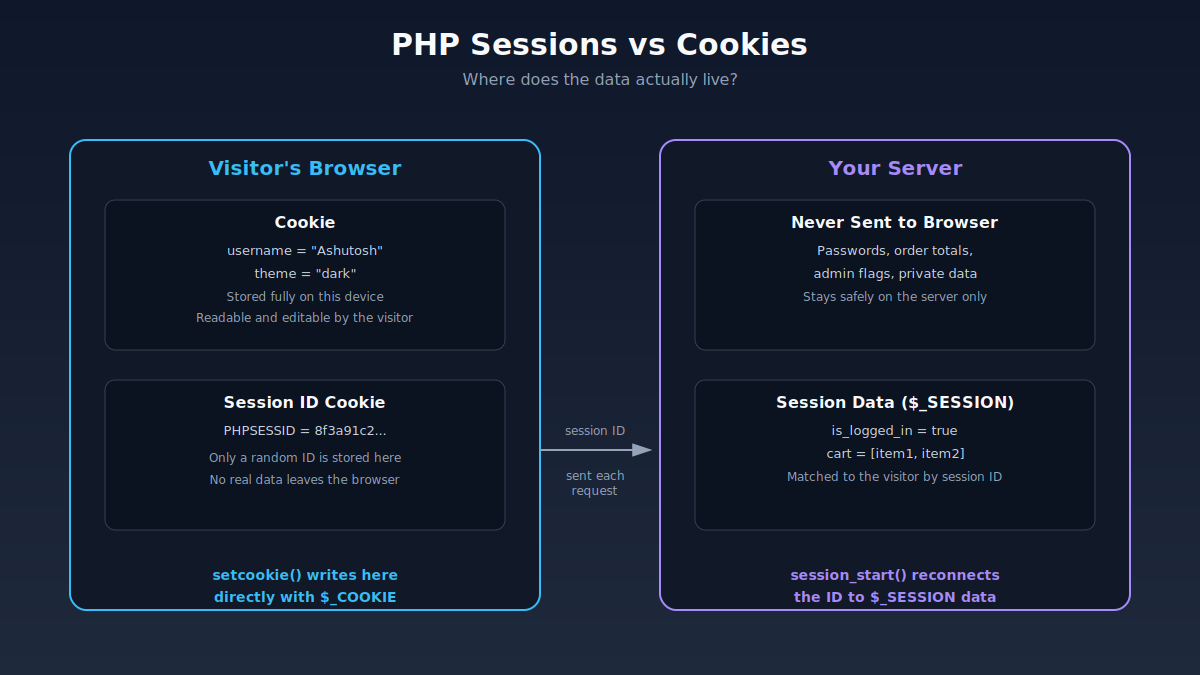
| Feature | Cookie | Session |
|---|---|---|
| Where data is stored | Visitor’s browser | Server |
| What the browser holds | The actual data | Just a session ID |
| Security for sensitive data | Weaker, visible on visitor’s device | Stronger, data never leaves server |
| Lifespan | Can be set to last days, months, or years | Usually ends when the browser closes, unless configured otherwise |
| Storage limit | Small, a few KB per cookie | Much larger, limited mainly by server resources |
| PHP superglobal used | $_COOKIE | $_SESSION |
| Needs a function call first | setcookie() | session_start() |
| Common use cases | “Remember me,” saved preferences, tracking | Login state, shopping carts, temporary form data |
When Should You Use a Session, and When a Cookie?
A simple rule of thumb: use a session for anything sensitive or temporary, and use a cookie for anything that should survive long after the browser closes and isn’t sensitive.
- Use a session for: login state, shopping cart contents during checkout, multi-step form data, anything you’d be uncomfortable with a visitor editing themselves.
- Use a cookie for: “remember me” preferences, a saved theme choice (light or dark mode), tracking whether a visitor has seen a popup before, non-sensitive settings that should persist for weeks or months.
Simple analogy: Ask yourself, “Would I be okay if the visitor could open their browser settings and directly read or edit this value?” If the answer is no, like a login state, use a session. If the answer is yes, like a font-size preference, a cookie is perfectly fine.
Interestingly, real-world login systems often use both together: a session tracks the actual logged-in state while the visitor is active, and a long-lasting cookie powers the “remember me” checkbox, quietly starting a fresh session automatically the next time they visit. If you’re building the actual login form itself, HTML Forms Explained and PHP GET vs POST Explained cover how that submitted data reaches your PHP script in the first place.
A Quick Word on Security
Cookies live on the visitor’s own device, which means a visitor (or anyone with access to their browser) can view, edit, or delete them freely using browser developer tools. Never store sensitive data like passwords, credit card numbers, or anything you wouldn’t want tampered with directly inside a cookie’s value.
Sessions are safer by design, since the actual data stays on your server. But sessions aren’t automatically bulletproof either. A few habits worth knowing about:
- Always call
session_start()before any output, or PHP will throw a “headers already sent” warning. - Regenerate the session ID after login using
session_regenerate_id(), which helps prevent a specific attack called session fixation, where an attacker tricks a visitor into using a known session ID. - Use the
httponlyandsecurecookie flags where possible, so the session cookie can’t be read by JavaScript and is only sent over HTTPS connections. - Never trust
$_COOKIEdata blindly. Just like$_GETand$_POST, cookie values are raw input from the visitor and should be validated before use, the same principle covered in PHP Error Handling Explained.
Common Beginner Mistakes
- Forgetting
session_start()on every page. It’s easy to remember it on the login page and forget it on the dashboard page, which makes$_SESSIONappear completely empty even though the login worked fine. - Trying to read a cookie on the same page load it was set. Since cookies only become readable starting from the next request, checking
$_COOKIEright aftersetcookie()on the same page will show nothing. - Storing sensitive data directly in a cookie. Passwords, account balances, or admin flags should live in a session, never in a cookie a visitor could edit themselves.
- Calling
setcookie()orsession_start()after HTML has already been printed. Both functions send HTTP headers, and headers must go out before any actual page content, even a single stray blank line before<?phpcan cause this error.
Scenario-Based Practice
Scenario 1: A “Keep Me Logged In” Checkbox
Problem: You’re building a login form with a “Remember me” checkbox, and when it’s checked, you want the visitor to stay logged in even after closing their browser and coming back a week later.
Solution: Use a long-lasting cookie to store a secure, random login token (never the actual password), and check that cookie on future visits to automatically start a new session if it’s valid. The session itself still handles the active login state; the cookie is only there to extend that experience across visits.
Scenario 2: A Shopping Cart on an Online Store
Problem: A customer adds three products to their cart, then browses to a different category page. You need the cart to still show three items.
Solution: Use a session. $_SESSION['cart'] can hold an array of product IDs and quantities, and since it lives on the server, the cart data stays consistent and can’t be tampered with by editing values in the browser.
Scenario 3: Remembering a Visitor’s Preferred Theme
Problem: Visitors can toggle between a light and dark theme on your site, and you want that choice to stick even if they come back next month.
Solution: Use a cookie with a long expiry, like setcookie("theme", "dark", time() + (86400 * 30), "/"). This isn’t sensitive data, and it needs to survive well beyond a single browsing session, which makes it a textbook cookie use case.
Scenario 4: A Multi-Step Signup Form
Problem: Your signup form is split across three pages (account details, address, confirmation), and you need to keep the data the visitor already entered as they move between pages.
Solution: Use a session. Store each step’s submitted values in $_SESSION as the visitor progresses, then read the full set back on the confirmation page. This avoids exposing half-finished signup data in the URL or asking the visitor to re-enter everything.
Interview Questions on Sessions and Cookies
Q1. What is the main difference between a session and a cookie in PHP? A cookie stores data directly on the visitor’s browser, while a session stores data on the server and only keeps a unique session ID in a small cookie on the browser. This makes sessions safer for sensitive information.
Q2. What function starts a PHP session, and where must it be called? session_start() starts or resumes a session, and it must be called before any HTML or other output is sent to the browser, since it works by sending HTTP headers.
Q3. How do you delete a cookie in PHP? There’s no dedicated delete function. You call setcookie() again with the same name but an expiry time set in the past, which tells the browser to remove it immediately.
Q4. What superglobal is used to read cookie data, and what about session data? Cookie values are read using the $_COOKIE superglobal, and session values are read using the $_SESSION superglobal, both of which behave like regular associative arrays.
Q5. Why might $_SESSION appear empty even after a successful login? The most common cause is forgetting to call session_start() on the page where you’re trying to read the session data. Without it on every page, PHP can’t reconnect the visitor to their existing session.
Q6. What is session fixation, and how can you help prevent it? Session fixation is an attack where someone tricks a visitor into using a known session ID, then hijacks that session once the visitor logs in. Calling session_regenerate_id() right after a successful login issues a fresh session ID, helping close this gap.
Interview Tip: If asked to compare sessions and cookies, lead with “where the data lives”, cookies live on the browser, sessions live on the server. That single distinction is what explains the security difference, the size limits, and why sessions are the standard choice for login systems.
Frequently Asked Questions
Q1. Do I need to call session_start() on every page?
Yes. session_start() must run at the top of every page where you want to read or write $_SESSION data. A common pattern is placing it inside a shared configuration file that every page includes at the very top.
Q2. Can a visitor turn off cookies and break my session-based login?
Yes, if a visitor disables cookies entirely, the session ID cookie can’t be stored, and PHP won’t be able to reconnect them to their session data on future page loads. This is rare today but worth knowing about for very security-conscious visitors.
Q3. How long does a PHP session last by default?
By default, a session typically ends when the visitor closes their browser, since the session ID cookie itself is usually a non-persistent “session cookie.” Server-side session data also has its own garbage-collection expiry, which is configurable in PHP’s settings.
Q4. Is $_COOKIE data safe to trust as-is?
No. Just like $_GET and $_POST, cookie data comes from the visitor’s browser and can be edited by anyone with access to it. Always validate and sanitize cookie values before using them in your logic.
Q5. What’s the difference between a session cookie and a PHP session?
A “session cookie” is a browser term for any cookie without an expiry date, meaning it disappears when the browser closes, regardless of whether PHP sessions are involved at all. A PHP session is a separate, server-side feature that happens to use one small cookie (the session ID) to identify the visitor.
Q6. Can I store an array or more complex data in $_SESSION?
Yes. Since $_SESSION is just a regular PHP array, you can store strings, numbers, arrays, and even nested arrays inside it, which is exactly how shopping carts and multi-step forms keep track of more complex data.
Conclusion
Sessions and cookies both solve the same basic problem, helping a stateless web remember who a visitor is, but they solve it in very different places. Cookies hand the data to the visitor’s own browser, making them great for small, non-sensitive things that need to last a long time. Sessions keep the real data locked away on your server, making them the right choice for anything sensitive or temporary, like a login state or a shopping cart.
A good way to make this stick is to open one of your own PHP projects, find any place where you’re trying to “remember” something about a visitor, and ask: “Would I be okay with this sitting in plain text on the visitor’s own computer?” If yes, a cookie will do. If no, reach for a session instead.
Trusted Sources & References
This guide is grounded in official documentation. For deeper reading, these are reliable places to go:
- PHP Manual — Sessions the official reference for
session_start(),$_SESSION, and session configuration - PHP Manual — setcookie() full details on every parameter the function accepts
- PHP Manual — Superglobals covers
$_COOKIEand$_SESSIONalongside PHP’s other superglobal variables - W3Schools — PHP Sessions beginner-friendly interactive examples
- W3Schools — PHP Cookies
- MDN — Using HTTP Cookies how cookies work at the HTTP level, browser-side
We recommend bookmarking MDN Web Docs it’s one of the most trusted, community-maintained references for the web in general.
Continue Learning
Want to build on what you just learned? Check out these related guides on 28LazyCoder:
- PHP GET vs POST Explained: What’s the Difference?
- PHP Arrays Explained: A Complete Beginner’s Guide with Examples
- PHP Conditional Statements Explained: A Beginner’s Guide with Examples
- PHP Error Handling Explained: Errors, Exceptions & try/catch
- HTML Forms Explained: A Complete Beginner’s Guide with Examples
Explore more tutorials on 28LazyCoder.