Why This Confused Me at First
When I built my very first PHP contact form, I copied a tutorial that used method="post" in the HTML form tag. It worked, so I moved on and didn’t think about it again for weeks. Then one day I built a simple search box, copied the same form code out of habit, and my search results page kept showing a blank page every time someone bookmarked or shared the link.
The problem? I had used method="post" for a search box, and POST data simply doesn’t show up in the URL. A bookmarked search link had nothing to search for.
That mix-up is exactly why GET and POST trip up so many beginners. They both send data from a form to your PHP script, but they do it in completely different ways, and picking the wrong one causes bugs that don’t look like bugs at all, they just look like “weird behavior.” By the end of this guide, you’ll know exactly which one to reach for and why.
What Are GET and POST, Really?
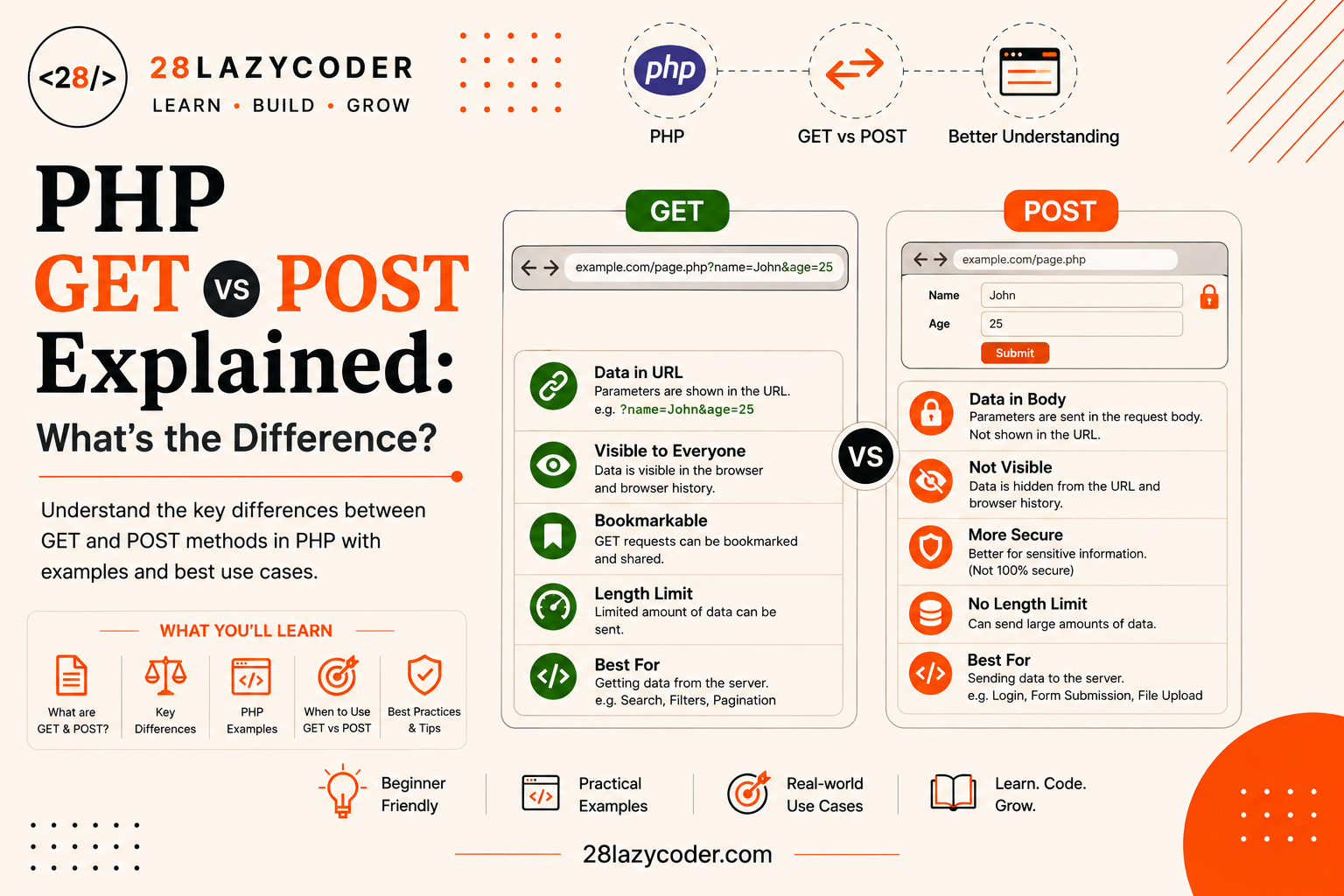
GET and POST are two HTTP methods (also called HTTP “verbs”). An HTTP method is simply a label that tells a web server what kind of action a request is trying to perform. Every time your browser talks to a website, it sends a request, and that request is stamped with one of these method labels.
Simple analogy: Think of GET and POST like two different ways of asking someone for something. GET is like shouting your request across a room, everyone can hear exactly what you asked for. POST is like handing someone a folded note, the room only sees that you handed something over, not what was written inside.
According to MDN’s HTTP request methods reference, GET is meant purely for asking a server for a resource, it shouldn’t be used to send data that changes anything. POST, on the other hand, is meant for sending data to the server, often to create or change something.
In plain PHP terms: GET and POST are the two most common ways an HTML form (or a link) sends information to your PHP script, and PHP gives you two matching superglobal arrays, $_GET and $_POST, to read that information back out.
If terms like “array” or “variable” feel new, it’s worth backing up to PHP Variables and PHP Arrays first, since $_GET and $_POST are both just arrays under the hood.
How a Web Form Actually Sends Data
Before jumping into the differences, let’s quickly picture what actually happens when you submit a form.
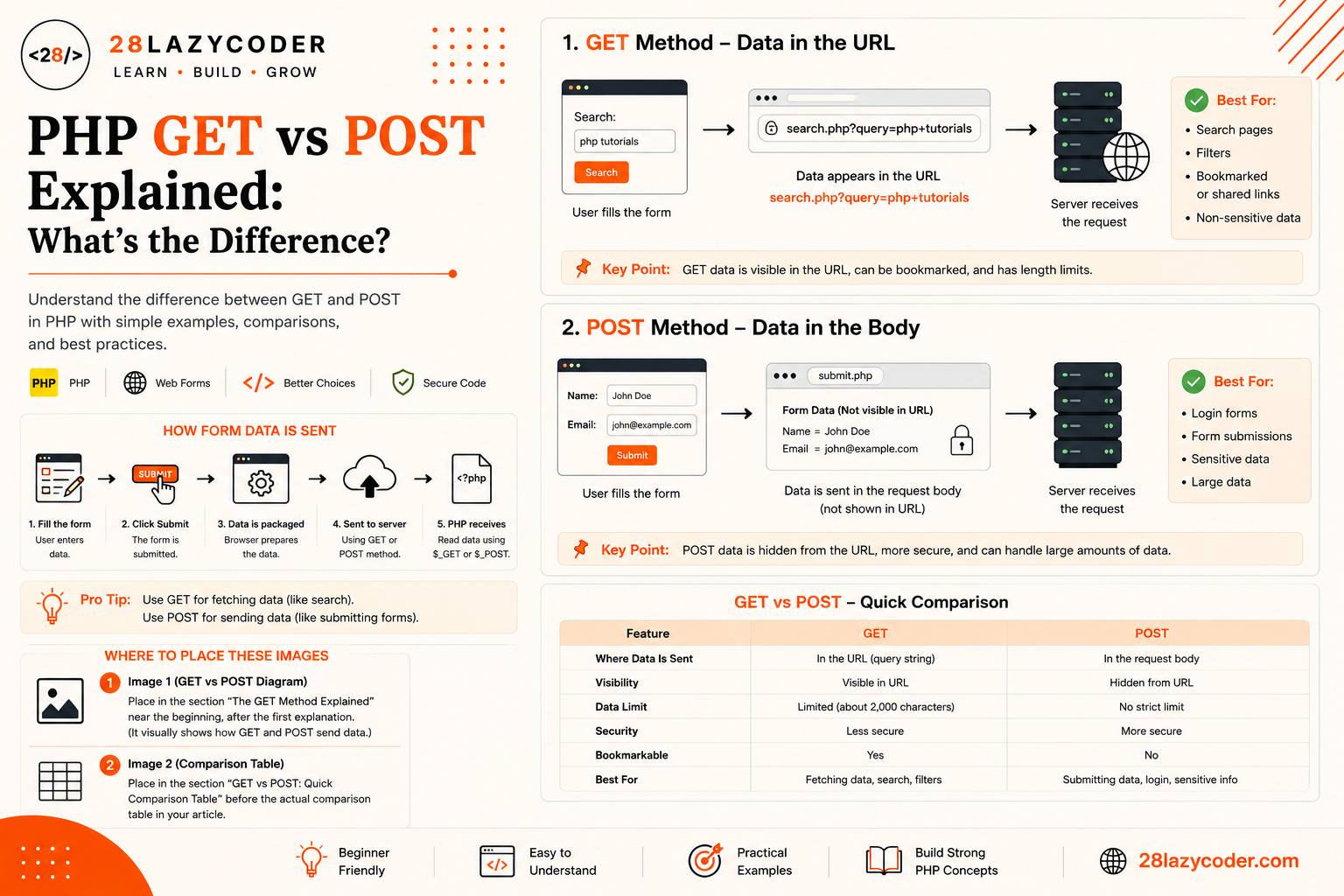
- You fill out fields on an HTML form (a name box, an email box, and so on).
- You click Submit.
- The browser packages up your form field names and values.
- The browser sends that package to the server, using either GET or POST, depending on what the form’s
methodattribute says. - Your PHP script receives that data and reads it using
$_GETor$_POST.
The method attribute on your <form> tag is what decides which of these two roads your data travels down:
html
<form action="process.php" method="get">
  <!-- data will be sent as GET -->
</form>

<form action="process.php" method="post">
  <!-- data will be sent as POST -->
</form>
That single word, get or post, changes everything about how the data travels, how safe it is, and how much of it you can send. Let’s break down each one.
The GET Method Explained
With GET, form data is attached directly to the URL (the web address) as a query string, the part after the question mark.
html
<form action="search.php" method="get">
  <input type="text" name="query">
  <input type="submit" value="Search">
</form>
If someone types “php tutorials” and submits this form, the browser sends them to a URL that looks like this:
search.php?query=php+tutorialsSimple analogy: GET is like writing your order on the outside of a delivery box in big marker letters. Anyone who sees the box in transit, the delivery driver, a neighbor, anyone glancing at it, can read exactly what’s inside without opening it.
Key Traits of GET
- Visible in the URL. Every field name and value appears after the
?in the address bar. - Bookmarkable and shareable. Because the data lives in the URL, that exact search or filter can be saved, bookmarked, or pasted into a chat.
- Limited in size. Browsers and servers enforce a maximum URL length, so GET isn’t suited for large amounts of data.
- Cacheable. Since a GET request is only supposed to retrieve data, browsers and search engines are free to cache the result of the same URL.
The POST Method Explained
With POST, form data is packed into the body of the HTTP request instead of the URL. The body is a hidden part of the request that isn’t shown in the address bar at all.
html
<form action="register.php" method="post">
  <input type="text" name="username">
  <input type="password" name="password">
  <input type="submit" value="Register">
</form>
Submit this form, and the URL stays as register.php, with the field names and values never showing up in the address bar.
Simple analogy: POST is like handing that same delivery box over with nothing written on the outside, just plain brown packaging. The driver knows a box was delivered, but not what’s inside unless they open it.
Key Traits of POST
- Not visible in the URL. Field values stay tucked inside the request body.
- Not bookmarkable. You can’t bookmark or share a “POST result” the way you can a GET URL, since there’s no data attached to the link itself.
- Larger data limits. POST can carry far more data than GET, including entire files.
- Not cached by default. Because POST usually changes something on the server (like adding a new user), browsers don’t cache POST requests the way they cache GET requests.
Reading the Data: $_GET and $_POST in PHP
Once the browser sends the data, PHP automatically collects it into two built-in arrays called superglobals. A superglobal is a special PHP variable that’s available everywhere in your script, inside functions, inside classes, anywhere, without you needing to do anything extra to access it.
Reading GET Data with $_GET
php
<?php
// URL: search.php?query=php+tutorials
$searchTerm = $_GET['query'];
echo "You searched for: " . $searchTerm;
?>
Here, $_GET['query'] pulls out the value attached to the query key in the URL’s query string. If you’re still getting comfortable with square-bracket access like this, PHP Arrays covers exactly how that works.
Reading POST Data with $_POST
php
<?php
if ($_SERVER['REQUEST_METHOD'] === 'POST') {
    $username = $_POST['username'];
    echo "Welcome, " . $username . "!";
}
?>
Notice the if check here. Wrapping form-reading code inside a condition like this is standard practice, so the script doesn’t try to read $_POST['username'] on a page load where no form was submitted yet. If conditions like this still feel unfamiliar, PHP Conditional Statements is a good place to review the basics.
Did You Know? Both
$_GETand$_POSTare confirmed as PHP’s official superglobal variables in the PHP Manual on Superglobals. They sit alongside other superglobals like$_SERVER,$_SESSION, and$_COOKIE, all of which you’ll run into as your PHP projects grow.
Tip: Always check whether a key exists before reading it, using
isset($_GET['query'])orisset($_POST['username']). If a visitor loads the page directly without submitting the form, that key simply won’t exist yet, and trying to read a missing array key will trigger a PHP warning. This is the same kind of defensive habit covered in PHP Error Handling.
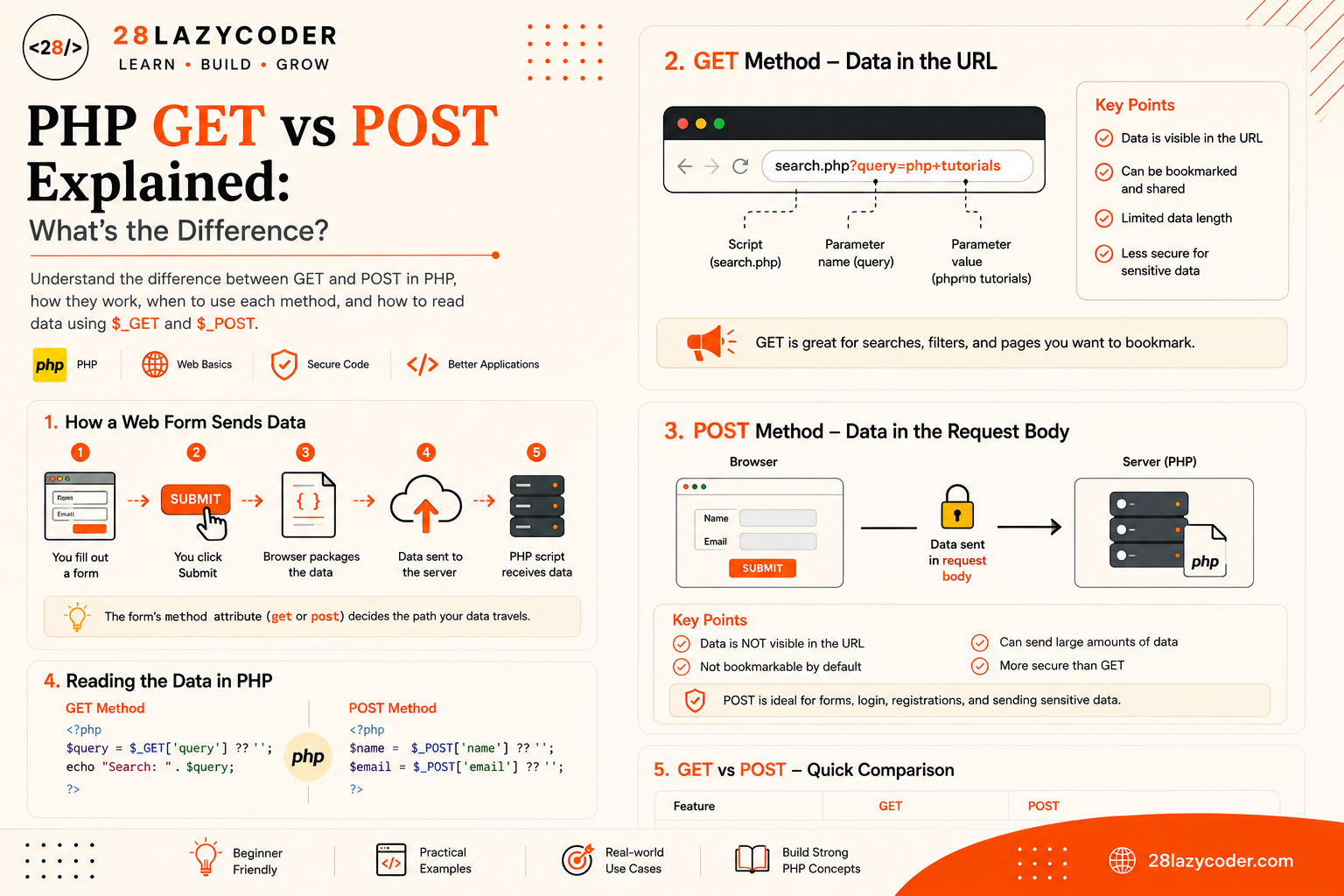
GET vs POST: Quick Comparison Table
| Feature | GET | POST |
|---|---|---|
| Where data is sent | Attached to the URL | Inside the request body |
| Visible in address bar | Yes | No |
| Bookmarkable / shareable | Yes | No |
| Data size limit | Small (URL length limits) | Large (including files) |
| Cached by browsers | Yes, by default | No, by default |
| Best suited for | Searches, filters, page navigation | Logins, registrations, sensitive or large data |
| Stays in browser history | Yes | Not by default |
| PHP superglobal used | $_GET | $_POST |
When Should You Use GET, and When Should You Use POST?
A simple rule of thumb: use GET when you’re only retrieving or filtering information, and use POST when you’re submitting, changing, or creating something.
- Use GET for: search boxes, filters, sorting options, pagination links (
?page=2), and anything the user might want to bookmark or share. - Use POST for: login forms, registration forms, payment forms, comment submissions, file uploads, and anything containing passwords or private details.
Simple analogy: Ask yourself, “Would I be okay if this exact request showed up in someone’s browser history or in a shared link?” If the answer is no, like with a password, POST is the right call. If the answer is yes, like a product search, GET works fine.
A Quick Word on Security
It’s a common myth that POST is automatically “secure” and GET is “insecure.” That’s not quite accurate. Neither method encrypts your data on its own, that job belongs to HTTPS, which encrypts the entire request, URL included. The real difference is about visibility and storage, not encryption.
GET data ends up in the browser’s address bar, browser history, server access logs, and can be seen by anyone glancing at the shared URL. That’s why passwords and personal details should never travel through GET, not because GET is “unencrypted,” but because that data lingers in visible, saved places long after the request is done. POST data avoids all of that exposure by staying out of the URL and history entirely.
Regardless of which method you use, always validate and sanitize incoming data with functions like htmlspecialchars() before displaying it back on a page, since raw user input should never be trusted as-is.
Common Mistakes Beginners Make
- Using GET for passwords or sensitive data. Since GET data appears directly in the URL and browser history, anything private has no business traveling through it.
- Forgetting the
isset()check. Reading$_GET['key']or$_POST['key']before confirming it exists causes warnings when the page loads without that data present. - Using POST for shareable content. Search results, filtered listings, or anything a user might want to bookmark should use GET, otherwise the link becomes useless once shared.
- Assuming form data is safe to use directly. Both
$_GETand$_POSTcontain raw input straight from the visitor. Skipping validation and sanitization opens the door to bugs and security issues.
Scenario-Based Practice
Scenario 1: A Blog Search Bar
Problem: You’re building a search bar for a blog, and you want visitors to be able to bookmark or share their exact search results page.
Solution: Use GET. Since the search term needs to appear in the URL for bookmarking and sharing to work, method="get" on the form and $_GET['query'] on the receiving script is the right fit.
Scenario 2: A User Login Form
Problem: You’re building a login form that collects a username and password, and you don’t want that data showing up in the browser history.
Solution: Use POST. Login credentials should never travel through the URL, so method="post" keeps the username and password inside the request body, read back with $_POST['username'] and $_POST['password'].
Scenario 3: A Product Filter on an Online Store
Problem: Your store has filters for category and price range, and customers often want to share a filtered product page with friends.
Solution: Use GET. Filter values like ?category=shoes&max_price=2000 belong in the URL so the exact filtered view can be bookmarked, shared, or revisited later.
Scenario 4: A File Upload Form
Problem: You’re building a form that lets users upload a profile picture.
Solution: Use POST. File uploads require sending binary data that doesn’t fit in a URL at all, so the form must use method="post" along with enctype="multipart/form-data", and the uploaded file is then read using PHP’s $_FILES superglobal alongside $_POST for any other fields.
Interview Questions on GET vs POST
Q1. What is the main difference between GET and POST in PHP? GET sends form data attached to the URL as a query string, while POST sends form data inside the request body, hidden from the URL. This affects visibility, bookmarking, size limits, and caching behavior.
Q2. Is POST more secure than GET? Not inherently. Neither method encrypts data by itself, that’s handled by HTTPS. POST is considered safer for sensitive data because it doesn’t expose values in the URL, browser history, or server logs, not because it’s encrypted.
Q3. Can you send a file upload using GET? No. File uploads require POST with enctype="multipart/form-data", since GET has strict size limits and can’t carry binary file data in a URL.
Q4. What happens if you access $_POST[‘field’] but the form was never submitted? PHP will raise a warning because that array key doesn’t exist yet. That’s why checking with isset($_POST['field']) or checking $_SERVER['REQUEST_METHOD'] before reading form data is standard practice.
Q5. What is $_REQUEST, and how does it relate to $_GET and $_POST? $_REQUEST is another PHP superglobal that combines values from $_GET, $_POST, and $_COOKIE into one array. It’s generally discouraged in modern PHP because it doesn’t tell you which method the data actually came from, which can create confusing or insecure behavior.
Q6. Why shouldn’t login forms use the GET method? Because GET data appears directly in the URL, it gets stored in browser history and server access logs in plain view. Anyone with access to that history, or a shared link, could see the submitted username and password.
Interview Tip: If asked to explain GET vs POST, lead with the “where the data travels” framing, GET travels in the URL, POST travels in the body. That single distinction explains nearly every other difference: visibility, bookmarking, size limits, and caching all follow from it.
Frequently Asked Questions
Q1. Can a single form use both GET and POST?
Not for the same submission. A form’s method attribute is either get or post, not both. However, a PHP script can absolutely handle both types of requests separately, for example, showing a form on a GET request and processing it on a POST request to the same page.
Q2. Is GET faster than POST?
Not meaningfully, in most real-world cases. Any difference is usually too small to notice. Choose GET or POST based on the nature of the data, not on speed.
Q3. What’s the maximum amount of data GET can send?
There’s no single fixed number, since it depends on the browser and server, but most practical limits sit somewhere around 2,000 characters for a full URL. POST doesn’t have this kind of restrictive limit.
Q4. Does POST data ever appear anywhere visible?
Not in the browser’s address bar or history. However, POST data can still be seen using browser developer tools or a network inspector, since it’s still plain text unless the connection uses HTTPS.
Q5. Should I use $_REQUEST instead of $_GET or $_POST?
Generally, no. Since $_REQUEST mixes data from multiple sources, it’s easy to accidentally process the wrong kind of input. Sticking to $_GET or $_POST directly makes your code’s intent clearer and safer.
Q6. Do AJAX requests also use GET and POST?
Yes. When JavaScript sends a request behind the scenes using fetch() or similar tools, it still specifies GET or POST, and PHP reads that data the exact same way, through $_GET or $_POST, on the receiving script.
Conclusion
GET and POST aren’t just two random keywords you type into a form tag, they represent two genuinely different ways of moving data from a visitor’s browser to your PHP script. GET puts everything out in the open, in the URL, which makes it perfect for anything shareable or bookmarkable. POST keeps things tucked inside the request body, which makes it the right choice for anything sensitive, large, or state-changing.
The best way to make this stick is to open one of your own PHP projects, find a form, and ask yourself: “Would this data make sense in a bookmarked link?” If yes, GET. If no, POST. That one question will get you the right answer almost every time.
Trusted Sources & References
This guide is grounded in official documentation. For deeper reading, these are reliable places to go:
- MDN — HTTP Request Methods Reference the official breakdown of GET, POST, and every other HTTP method
- MDN — GET Request Method
- PHP Manual — Superglobals the official reference for
$_GET,$_POST, and other superglobal variables - W3Schools — PHP $_GET Superglobal beginner-friendly interactive examples
- W3Schools — PHP $_POST Superglobal
We recommend bookmarking MDN Web Docs it’s one of the most trusted, community-maintained references for the web in general.
Continue Learning
Want to build on what you just learned? Check out these related guides on 28LazyCoder:
- PHP Variables: Everything You Need to Know
- PHP Arrays Explained: A Complete Beginner’s Guide with Examples
- PHP Conditional Statements Explained: A Beginner’s Guide with Examples
- PHP Error Handling Explained: Errors, Exceptions & try/catch
- PHP Functions Explained: A Complete Beginner’s Guide
Explore more tutorials on 28LazyCoder.