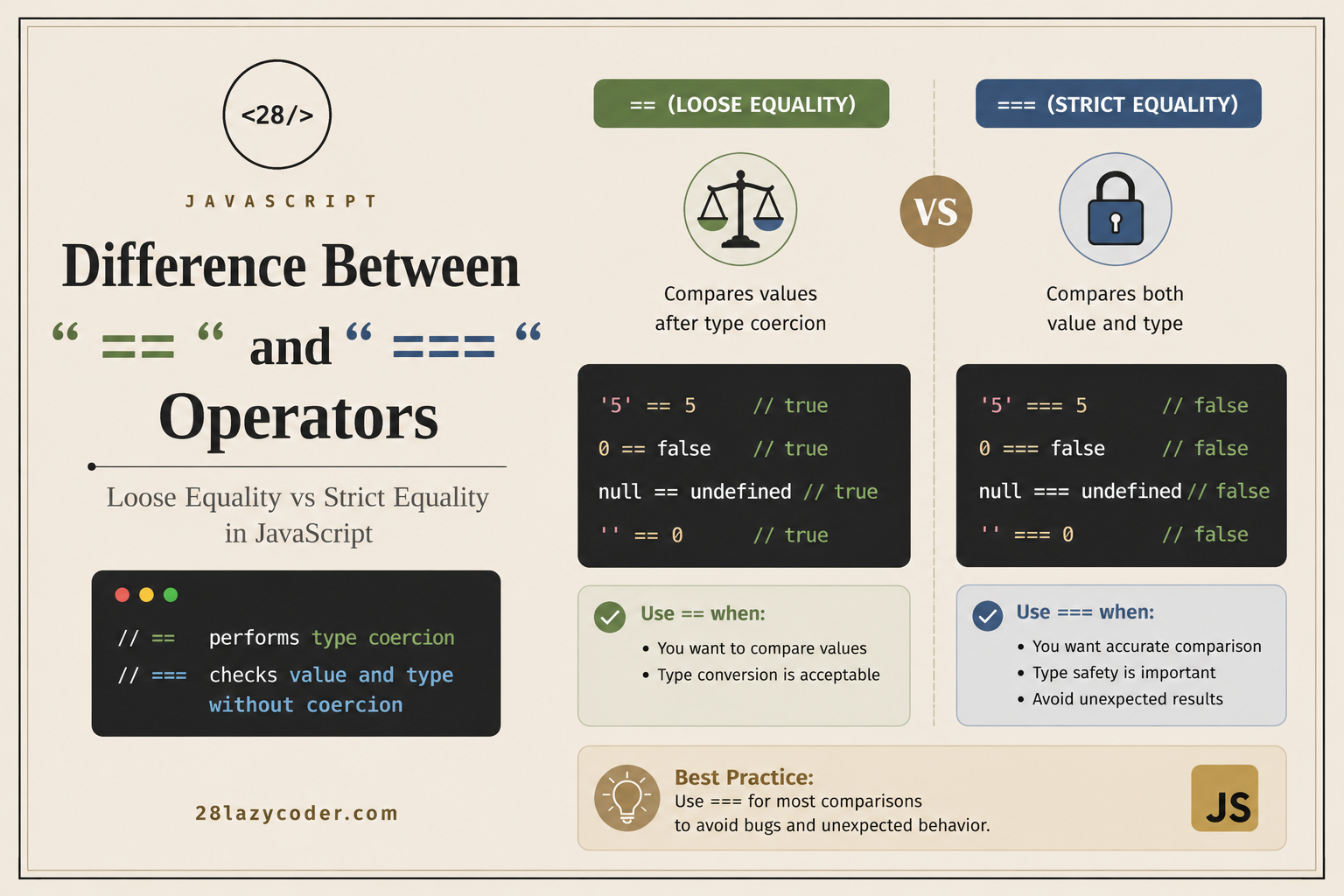
If you’ve recently started learning JavaScript, you’ve probably come across two equality operators:
==and
===At first glance, they seem to do the same thing—compare two values.
So why does JavaScript have two different operators?
The answer lies in how JavaScript compares values and data types. Understanding this difference is one of the first steps toward writing cleaner, more reliable code.
Let’s break it down with simple examples.
What is == (Loose Equality)?
The == operator compares only the values.
If the values have different data types, JavaScript will try to convert one value into another type automatically before making the comparison. This process is called type coercion.
Example
console.log(5 == "5");Output:
trueWhy?
Because JavaScript converts the string "5" into the number 5 before comparing them.
Internally, it’s similar to:
5 == Number("5")which becomes:
5 == 5Result:
trueWhat is === (Strict Equality)?
The === operator is stricter.
It compares both the value and the data type.
If either the value or the type is different, the comparison returns false.
Example
console.log(5 === "5");Output:
falseAlthough both look like the number 5, one is a number and the other is a string.
Since the types don’t match, JavaScript doesn’t even try to convert them.
Let’s Compare Them Side by Side
| Comparison | == | === |
|---|---|---|
5 == "5" | true | false |
10 == 10 | true | true |
true == 1 | true | false |
false == 0 | true | false |
null == undefined | true | false |
"10" == 10 | true | false |
Notice how == often gives surprising results because of automatic type conversion.
A Real-Life Analogy
Imagine you’re checking IDs at the entrance of an event.
== is like a security guard who says:
“Your name matches? Come in.”
Even if the ID format is different, they’re willing to overlook it.
=== is like a stricter guard who says:
“Your name matches and your government-issued ID is valid? Welcome.”
No shortcuts. Everything must match exactly.
That’s why most developers prefer ===.
Why Can == Be Dangerous?
Let’s look at a few examples that surprise many beginners.
console.log("" == 0);Output:
trueconsole.log(false == 0);Output:
trueconsole.log(null == undefined);Output:
trueThese results happen because JavaScript performs automatic type coercion, which isn’t always obvious.
This behavior can introduce bugs that are difficult to spot.
When Should You Use ==?
There are a few situations where == can be useful, especially when you intentionally want JavaScript to perform type coercion.
For example:
if (userInput == 10) {
    // Accepts both 10 and "10"
}
However, this should be done carefully and only when you fully understand the implications.
When Should You Use ===?
For most applications, === is the better choice.
It helps you:
- Avoid unexpected bugs
- Write predictable code
- Improve readability
- Make debugging easier
Example:
const age = "18";

if (age === 18) {
    console.log("Adult");
} else {
    console.log("Not Adult");
}
Output:
Not AdultHere, age is a string, not a number. The strict comparison correctly identifies the mismatch.
Interview Question
What will be the output?
console.log(0 == false);
console.log(0 === false);

console.log(null == undefined);
console.log(null === undefined);
Answer
true
false

true
false
If you understand why these outputs occur, you’ve already grasped the core difference between == and ===.
Best Practice
Modern JavaScript developers almost always recommend using === unless you have a very specific reason not to.
Many coding standards, including popular style guides, encourage strict equality because it reduces bugs and makes code easier to understand.
As a beginner, adopting === as your default habit is a smart choice.
Final Thoughts
The difference between == and === may seem small, but it can have a big impact on your code.
- Use
==when you intentionally want JavaScript to perform type coercion. - Use
===when you want both the value and the data type to match exactly.
If you’re ever unsure which one to use, choose ===. It leads to more predictable, maintainable, and bug-free code.
Frequently Asked Questions (FAQs)
What is the difference between == and === in JavaScript?
The == operator compares values after performing type coercion if necessary, while === compares both value and type without converting either operand.
Which operator should I use?
Use === in most cases. It’s safer and avoids unexpected behavior caused by automatic type conversion.
Why does "5" == 5 return true?
Because the == operator converts the string "5" into the number 5 before comparing them.
Why does "5" === 5 return false?
Because === checks both value and type. One operand is a string and the other is a number.
Is == ever useful?
Yes, but only in specific situations where type coercion is intentional and well understood. For everyday development, === is the recommended choice.