Have you ever written code where a setTimeout set for 0 milliseconds still runs after other code that comes below it? Or noticed that a Promise always seems to “jump the line” ahead of a setTimeout, even when the timer is set to finish first?
That’s not a bug. That’s the JavaScript event loop quietly doing exactly what it’s designed to do.
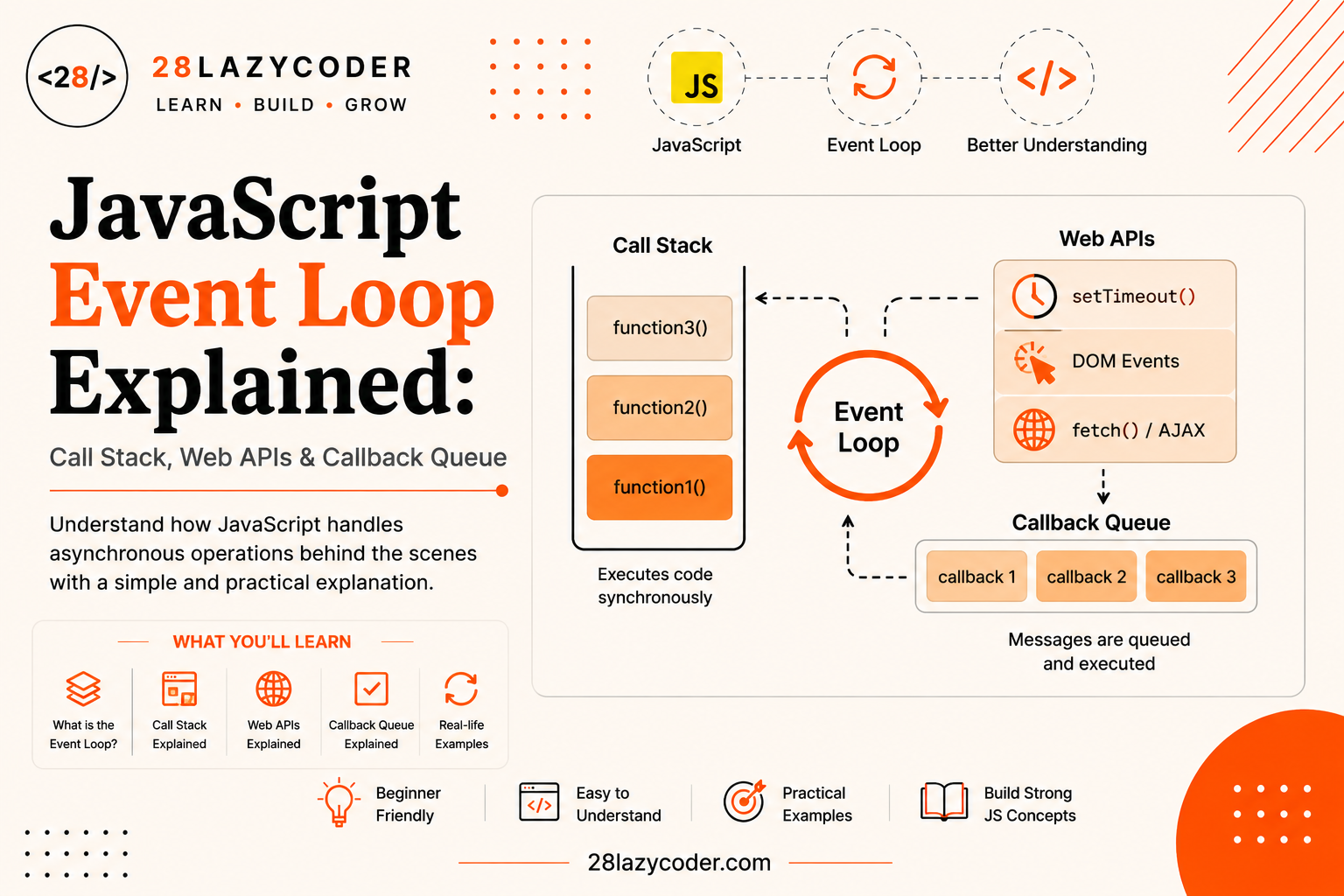
The event loop is one of those topics that sounds intimidating from the name alone, but the actual idea is refreshingly simple once you see it laid out piece by piece. In this guide, we’ll build it up slowly, using a restaurant analogy you’ll be able to picture in your head, so that terms like “call stack,” “Web APIs,” and “callback queue” stop feeling like scary jargon and start feeling like common sense.
If you haven’t looked at JavaScript Promises yet, this guide will make a lot more sense once you’ve read that one first but don’t worry, we’ll still explain everything from scratch here too.
Why JavaScript Needs an Event Loop
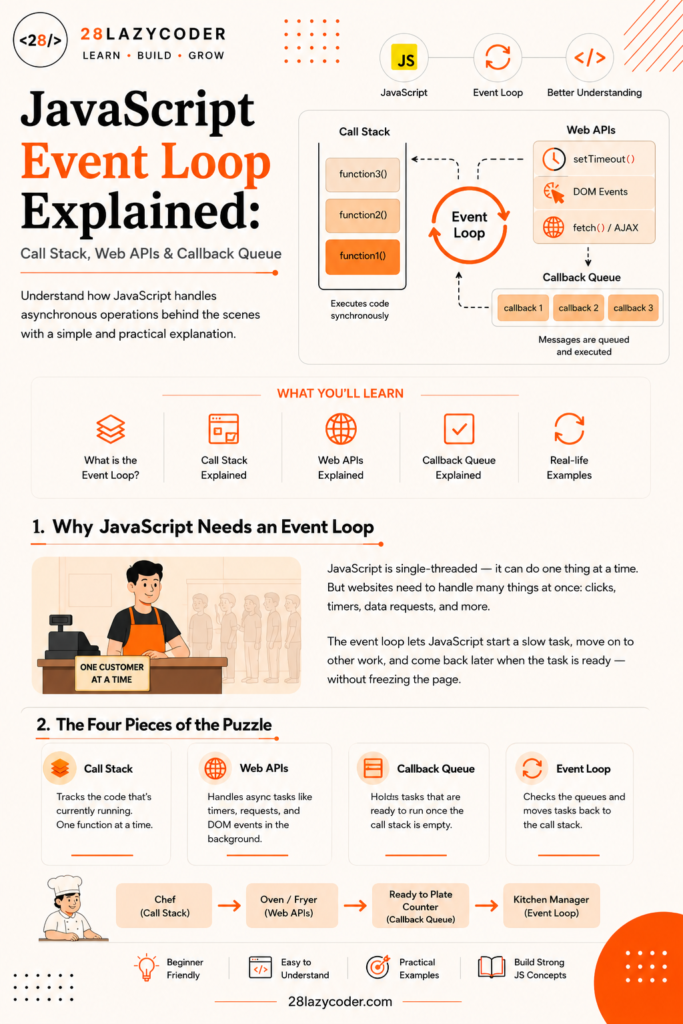
Here’s a fact that surprises a lot of beginners: JavaScript can only do one thing at a time. This is called being single-threaded imagine a single cashier working a single register, serving one customer at a time, with no way to open a second counter.
But think about how many things a website juggles at once: waiting for a button click, fetching data from a server, running a 3-second timer, and updating the page all seemingly “at the same time.” If JavaScript can only do one thing at a time, how does none of that freeze the page while waiting?
That’s exactly the problem the event loop solves. It’s the system that lets JavaScript start a slow task, immediately move on to other work instead of sitting around waiting, and then come back to finish that slow task later once it’s actually ready all without ever needing a second cashier.
The Four Pieces of the Puzzle
Before we go step by step, let’s meet the four main players. Think of this section as introducing the characters before the story starts.
| Piece | What It Does |
|---|---|
| Call Stack | Where JavaScript keeps track of the code currently running, one function at a time |
| Web APIs | Browser-provided helpers that handle slow tasks (timers, network requests) in the background |
| Callback Queue | A waiting line for tasks (like setTimeout callbacks) that finished in the background and are ready to run |
| Event Loop | The constant checker that moves finished tasks from the queues back into the call stack |
Simple analogy: Picture a busy restaurant kitchen.
- The call stack is the chef only one dish can be actively cooked by the chef at any given moment.
- The Web APIs are the oven and the deep fryer you can put something in and walk away, because they work on their own in the background.
- The callback queue is the “ready to plate” counter dishes wait here once the oven timer goes off, until the chef is free to plate them.
- The event loop is the kitchen manager, constantly glancing over: “Is the chef free? Yes? Then grab the next ready dish from the counter and hand it over.”
Let’s look at each piece up close.
The Call Stack Explained
The call stack is a list JavaScript uses to keep track of which function is currently running, and which function called it. Every time a function is called, it gets added (“pushed”) to the top of the stack. Every time a function finishes, it gets removed (“popped”) off the top.
javascript
function greet() {
  return sayHello();
}

function sayHello() {
  return "Hello!";
}

console.log(greet());
Here’s what happens on the call stack, step by step:
greet()is called → pushed onto the stack.- Inside
greet(),sayHello()is called → pushed on top ofgreet(). sayHello()finishes and returns"Hello!"→ popped off the stack.greet()finishes → popped off the stack.
Simple analogy: Think of the call stack like a stack of plates. You can only add a plate to the top, and you can only remove the plate that’s currently on top never one from the middle. This “last in, first out” rule is exactly how the call stack behaves.
If the call stack gets too deep (usually from a function endlessly calling itself), you get the famous “Maximum call stack size exceeded” error the plate stack has simply gotten too tall to hold.
Web APIs: Where the Waiting Happens
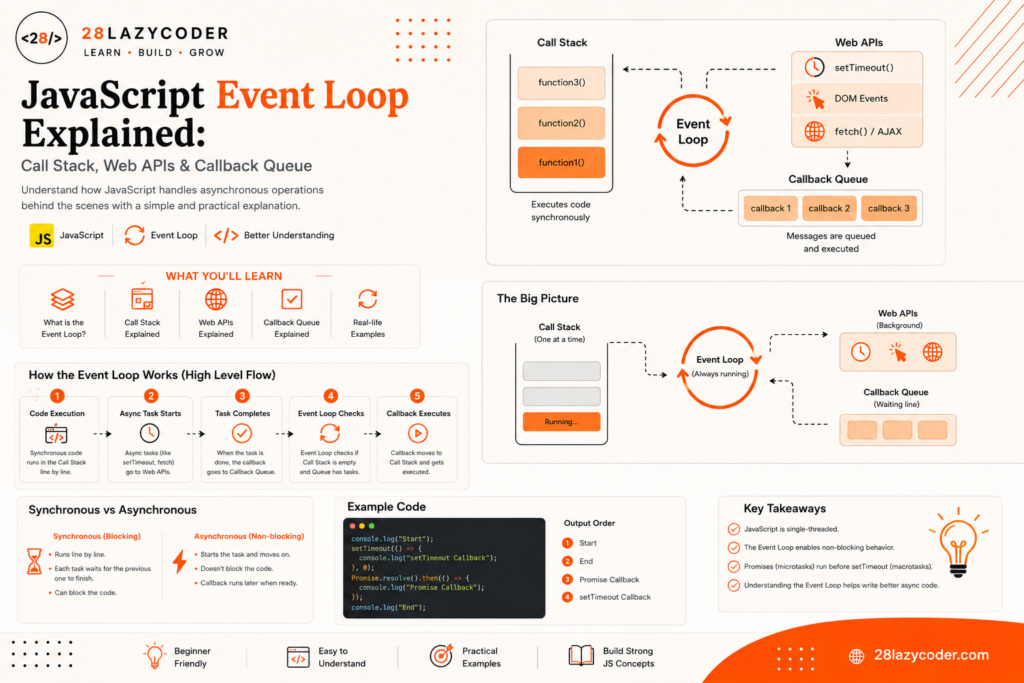
Here’s the part that trips people up: functions like setTimeout(), fetch(), and DOM event listeners are not actually part of the JavaScript language itself. They’re provided by the browser (or by Node.js, in server-side JavaScript), and are known as Web APIs.
When you call setTimeout(), JavaScript doesn’t sit around counting seconds. Instead, it hands the timer off to the browser’s Web API, and immediately moves on to the next line of code.
javascript
console.log("Start");

setTimeout(() => {
  console.log("This runs later");
}, 2000);

console.log("End");
Output:
Start
End
This runs later
Notice that "End" logs before "This runs later", even though setTimeout appears earlier in the code. That’s because the browser’s Web API is quietly counting down the 2 seconds in the background, while the call stack keeps moving through the rest of the script without waiting.
The Callback Queue (Task Queue)
Once a Web API finishes its background job — like a timer hitting zero, or a network request finally responding it doesn’t jump straight back into the running code. Instead, its callback function gets placed into the callback queue (also called the task queue or macrotask queue), where it waits patiently in line.
Simple analogy: Back at our restaurant, this is the “ready to plate” counter. The oven timer went off, meaning the dish is done but it still has to wait its turn until the chef (the call stack) is completely free.
This waiting is important: a task in the callback queue cannot jump into the call stack while the call stack is still busy, no matter how long it’s already been waiting.
The Microtask Queue: Promises Cut in Line
Here’s where things get interesting. Promises (from .then(), .catch(), .finally(), and async/await) don’t use the regular callback queue at all. They use a separate, higher-priority line called the microtask queue.
The rule the event loop follows is simple but important: after every single task from the call stack finishes, the entire microtask queue is fully emptied before the event loop even looks at the callback queue.
javascript
console.log("Start");

setTimeout(() => {
  console.log("Timeout callback");
}, 0);

Promise.resolve().then(() => {
  console.log("Promise callback");
});

console.log("End");
Output:
Start
End
Promise callback
Timeout callback
Even though the setTimeout was set to 0 milliseconds, the Promise callback still runs first. That’s because microtasks (Promises) always get fully cleared out before the event loop is allowed to touch the callback queue (setTimeout, click events, and similar tasks).
Simple analogy: If the callback queue is the “ready to plate” counter, the microtask queue is a VIP order that the kitchen manager insists on plating immediately, every single time the chef becomes free before serving anyone waiting at the regular counter.
If you haven’t worked through Promises in detail yet, our JavaScript Promises guide is the natural companion to this one.
The Event Loop: Putting It All Together
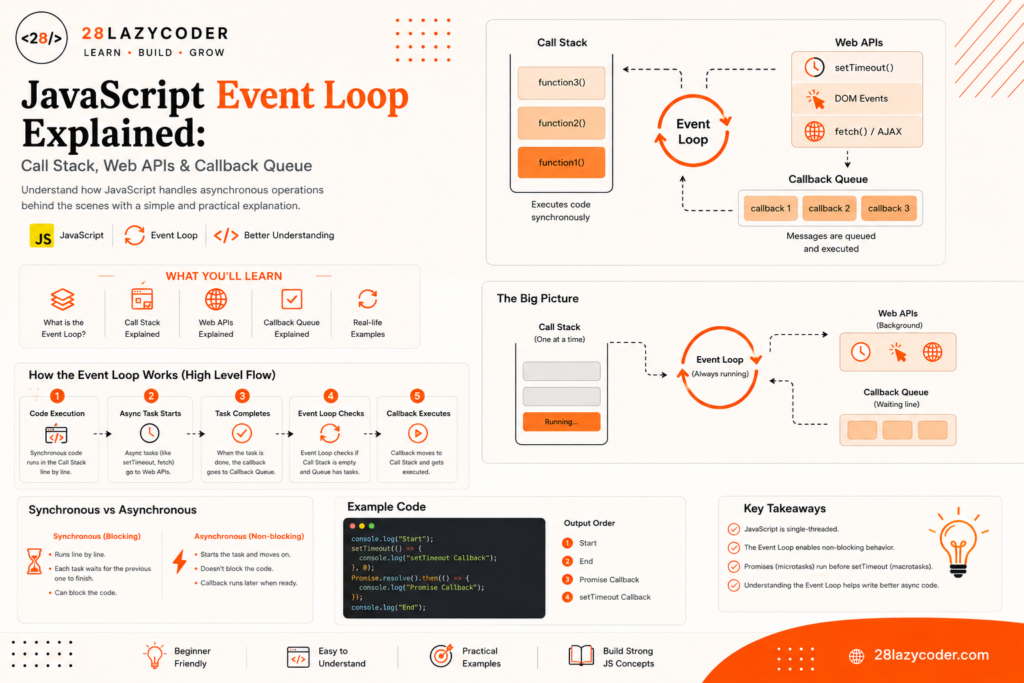
Now we can define the event loop properly. The event loop is a constantly repeating process that follows one simple rule, over and over, for as long as your page is open:
- Run everything currently on the call stack, until it’s completely empty.
- Once empty, run every task waiting in the microtask queue, one at a time, until that queue is also empty.
- Take one task from the callback queue and push it onto the call stack.
- Go back to step 1.
That’s genuinely the whole mechanism. Every “confusing” async behavior in JavaScript why Promises seem to jump ahead, why setTimeout(fn, 0) doesn’t run instantly comes directly from following those four steps, every single time.
Walking Through a Real Example
Let’s trace through a slightly bigger example, one line at a time, to see the whole system working together.
javascript
console.log("1: Script starts");

setTimeout(() => {
  console.log("2: Timeout finished");
}, 0);

Promise.resolve()
  .then(() => console.log("3: First promise"))
  .then(() => console.log("4: Second promise"));

console.log("5: Script ends");
Here’s the play-by-play:
console.log("1: Script starts")runs immediately on the call stack → logs “1: Script starts”.setTimeouthands its callback to the Web API, and moves on immediately (it does not wait, even with0ms).Promise.resolve().then(...)schedules its first.then()callback into the microtask queue.console.log("5: Script ends")runs immediately → logs “5: Script ends”.- The call stack is now empty, so the event loop clears the microtask queue completely: it runs the first
.then()(logging “3: First promise”), which schedules the second.then()and since the microtask queue must be fully drained, that one runs too, logging “4: Second promise”. - Only now does the event loop check the callback queue, finds the
setTimeoutcallback waiting there, and finally runs it → logs “2: Timeout finished”.
Final output:
1: Script starts
5: Script ends
3: First promise
4: Second promise
2: Timeout finished
If that order feels surprising at first, that’s completely normal trace through it slowly a second time, and it’ll click.
Call Stack vs Callback Queue vs Microtask Queue
| Concept | What Lives Here | Priority |
|---|---|---|
| Call Stack | Currently executing code | Runs first, always |
| Microtask Queue | Promise .then()/.catch()/.finally(), async/await continuations | Fully emptied after every call stack run |
| Callback Queue | setTimeout, setInterval, DOM events, fetch completions | Only one task taken per event loop cycle, after microtasks are empty |
| Web APIs | Where timers and network requests actually “wait” in the background | Not a queue a separate background environment |
Common Mistakes Beginners Make
- Assuming
setTimeout(fn, 0)runs instantly. It always waits for the current call stack to finish first, and often the microtask queue too — “0 ms” means “as soon as possible,” not “immediately.” - Thinking Promises are handled by
setTimeoutinternally. They’re not. Promises use the separate, higher-priority microtask queue, which is why they consistently run beforesetTimeoutcallbacks. - Believing JavaScript runs things in parallel. JavaScript itself is single-threaded; only the browser’s Web APIs (not JavaScript itself) do work “in the background.”
- Writing an infinite microtask loop, such as a
.then()that keeps scheduling more.then()calls forever since the microtask queue must fully empty before moving on, this can freeze the page just like an infinitewhileloop would. - Confusing the callback queue with the microtask queue and assuming all asynchronous tasks are treated equally by the event loop. They aren’t microtasks always win.
Interview Questions on the Event Loop
- Is JavaScript single-threaded or multi-threaded? JavaScript itself is single-threaded, meaning it can execute only one piece of code at a time on the call stack. Background work like timers and network requests is handled separately by the browser’s Web APIs.
- What’s the difference between the callback queue and the microtask queue? The callback queue holds tasks like
setTimeoutcallbacks and DOM events, while the microtask queue holds Promise callbacks. The microtask queue is always fully emptied before the event loop processes anything from the callback queue. - Why does a Promise usually run before a
setTimeout(fn, 0)? Because Promise callbacks go into the microtask queue, which has higher priority and is always cleared completely before the event loop even looks at the callback queue, wheresetTimeoutcallbacks wait. - What causes a “Maximum call stack size exceeded” error? It happens when the call stack grows too large, usually because of a function that calls itself (recursion) without a proper stopping condition.
- Are
setTimeoutandfetchpart of the JavaScript language? No. They are Web APIs provided by the browser (or Node.js APIs on the server), not features of the core JavaScript language itself. - What does the event loop actually do, in one sentence? It continuously checks whether the call stack is empty, and if it is, moves the next waiting task — first from the microtask queue, then from the callback queue — onto the call stack to be run.
Scenario-Based Problems and Solutions
Scenario 1: Your setTimeout set for 3 seconds seems to run after 5 seconds instead. Solution: The call stack was likely still busy with other synchronous code (like a heavy loop) when the timer finished. The callback has to wait in the callback queue until the call stack is completely free the timer measures the minimum wait, not a guaranteed exact time.
Scenario 2: You have both a .then() and a setTimeout(fn, 0), and you need the setTimeout to run first. Solution: You generally can’t force this directly, since microtasks always run before the callback queue is checked. If ordering truly matters, restructure the code so the dependent logic runs inside the Promise chain itself, instead of relying on race timing.
Scenario 3: Your page freezes completely after adding a chain of .then() calls. Solution: Check whether a .then() callback is scheduling another microtask that leads back into itself, creating an infinite microtask loop. Since microtasks must fully drain before anything else runs, this blocks the page just like an infinite loop would.
Scenario 4: You’re fetching data with fetch() and console.log runs before the data actually appears. Solution: This is expected fetch() is a Web API that returns a Promise immediately, while the actual response arrives later. Any code that depends on the fetched data needs to live inside a .then() block (or after an await), not directly below the fetch() call.
Frequently Asked Questions
What is the event loop in JavaScript, in one sentence?
The event loop is the mechanism that lets JavaScript run one thing at a time on the call stack, while continuously checking whether any waiting background tasks (from Web APIs) are ready to be moved in and run next.
Is the event loop part of JavaScript itself?
Not exactly. The event loop is provided by the JavaScript runtime the browser or Node.js rather than being a built-in language feature you write code with directly.
Why do Promises always run before setTimeout?
Because Promise callbacks go into the microtask queue, which the event loop always fully empties before it’s allowed to check the callback queue where setTimeout callbacks are waiting.
Does async/await work differently from the event loop?
No async/await is built entirely on top of Promises, so it follows the exact same microtask queue rules. It’s just a different, more readable way to write Promise-based code.
Can the event loop cause my page to freeze?
Yes, indirectly. If synchronous code on the call stack takes too long to finish (like a heavy loop), or if microtasks keep scheduling more microtasks endlessly, the browser can’t repaint the page or respond to clicks until that work clears.
Do all browsers implement the event loop the same way?
The core idea (call stack, task queues, microtasks) is standardized in the JavaScript specification and Web APIs, but some fine implementation details can vary slightly between browsers and Node.js.
Trusted Sources & References
This guide is grounded in official documentation. For deeper reading on any of these topics, these are reliable places to go:
- MDN — The Event Loop how JavaScript’s execution model actually works
- MDN — Concurrency model and the Event Loop the original in-depth MDN guide on the call stack and queues
- MDN — setTimeout() how timers are scheduled through the Web API
- MDN — Using Promises how the microtask queue relates to Promises
- web.dev — Tasks, microtasks, queues and schedules Google’s practical breakdown of the event loop and task priority
- W3Schools — JavaScript Async beginner-friendly interactive examples
We recommend bookmarking MDN Web Docs it’s the most trusted, community-maintained reference for JavaScript and the web in general.
Continue Learning
Want to build on what you just learned? Check out these related guides on 28LazyCoder:
- JavaScript Promises Explained: A Complete Beginner’s Guide
- JavaScript Functions: A Complete Guide with Examples
- JavaScript Scope Explained: Global, Function & Block Scope
- JavaScript Events Explained: A Complete Beginner’s Guide
- JavaScript Loops and Iteration: A Complete Beginner’s Guide
- var, let, and const: The Difference That Actually Matters
Explore more tutorials on 28LazyCoder.